
Bills Payment
Table of Contents
- Overview
- Getting Started
- Authentication
- Integration Flow
- Step-by-Step Implementation
- Field Reference
- Amount Types
- Response Codes
- Test Data
- Examples
- Best Practices
- API Summary
Overview
The QuickTeller Bills Payment API enables merchants to integrate bill payment functionality into their applications. This service allows you to process payments for various services including:
- Cable TV subscriptions (DSTV, GOtv, Startimes)
- Utility bills (Electricity, Water)
- Insurance payments
- Tax payments
- Airline tickets
- Donations
- Internet services
- And many more...
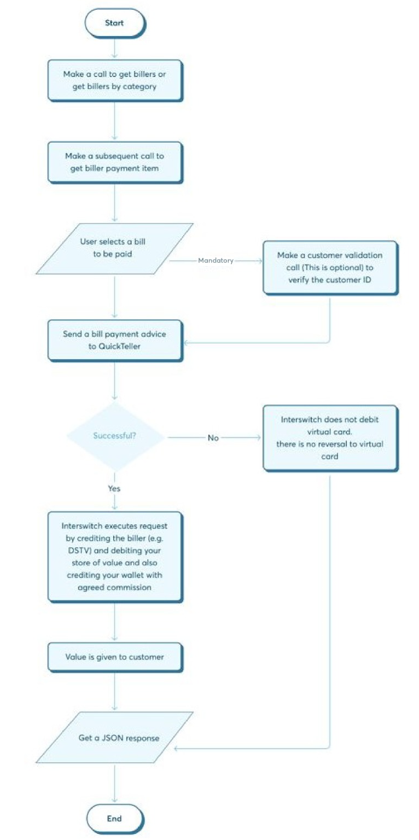
How It Works
When a user pays for a service on your platform:
- You identify the category, biller, and payment item to obtain a
PaymentCode. - You validate the customer's account identifier (when required by the biller).
- You submit the payment details to the Bills Payment API.
- Interswitch charges your virtual card for the equivalent amount.
- Value is delivered to the customer's service account.
- You earn commission on each successful transaction.
Getting Started
Prerequisites
Before integrating, ensure you have:
- Terminal ID for authentication
- Access credentials (Client ID and Secret)
Terminal ID and Channel Codes
Every TerminalId is composed of the following parts, with no separators:
{ChannelId}{TerminalOwnerCode}{RandomDigits}ChannelIdidentifies the channel through which the transaction originates.TerminalOwnerCodeis the terminal owner's assigned code.RandomDigitsis an optional numeric suffix. When this part is used,0001is the preferred value.
For example, 5IIP0001 consists of channel ID 5 (Bank API), terminal owner code IIP, and suffix 0001.
| Channel ID | Channel |
|---|---|
1 | ATM |
2 | POS |
3 | Web |
4 | MOB |
5 | Bank API |
6 | PCPOS |
7 | Location |
Base URLs
| Environment | Base URL |
|---|---|
| QA/Testing | https://qa.interswitchng.com/quicktellerservice/api/v5 |
| Production | https://orion.interswitchng.com/quicktellerservice/api/v5 |
Amount Convention
All monetary amounts are in the minor unit of the currency (kobo for NGN).
10000= ₦100.00500000= ₦5,000.00- Multiply Naira by 100 to get kobo.
Architecture Flow
Authentication
All API requests require a Bearer token. Generate your access token using the OAuth 2.0 client credentials flow.
Token Generation
Endpoint: POST https://passport-sandbox.interswitchng.com/passport/oauth/token
Request:
curl --location 'https://passport-sandbox.interswitchng.com/passport/oauth/token' \
--header 'Authorization: Basic <BASE64_ENCODED_CREDENTIALS>' \
--header 'Content-Type: application/x-www-form-urlencoded' \
--data-urlencode 'scope=profile' \
--data-urlencode 'grant_type=client_credentials'
Headers:
| Header | Value | Description |
|---|---|---|
Authorization | Basic <credentials> | Base64 encoded client_id:client_secret |
Content-Type | application/x-www-form-urlencoded | Request format |
Response:
{
    "access_token": "eyJhbGciOiJSUzI1NiIsInR5cCI6IkpXVCJ9...",
    "token_type": "bearer",
    "expires_in": 43199,
    "scope": "profile",
    "merchant_code": "MX52988",
    "merchant-wallet-actions": ["settle", "transact", "reverse"],
    "terminalId": "3PBL0001",
    "env": "TEST",
    "client_name": "QTSVA UAT",
    "email": "[email protected]"
}
Important: Tokens expire after approximately 12 hours (expires_in value in seconds). Implement token refresh logic in your application.
Integration Flow
The complete bill payment flow involves these steps:
Step 1: Get Categories
    │
    ▼
Step 2: Fetch Billers by Category
    │
    ▼
Step 3: Fetch Payment Items (required — source of PaymentCode)
    │
    ▼
Step 4: Validate Customer (when required by the biller)
    │
    ▼
Step 5: Make Payment
    │
    ▼
Step 6: Query Transaction Status (recommended)
Step-by-Step Implementation
Step 1: Get Categories
Purpose: Retrieve the complete list of service categories to understand what types of payments are available and identify which category contains your target service.
Description: This initial step provides a high-level overview of all supported payment categories (e.g., Utility Bills, Cable TV, Insurance, Donations). Each category includes a unique ID, name, and description to help you organize and present payment options in your application.
Endpoint: GET /services/categories
Request:
curl 'https://qa.interswitchng.com/quicktellerservice/api/v5/services/categories' \
-H 'Authorization: Bearer <TOKEN>' \
-H 'terminalId: <YOUR_TERMINAL_ID>' \
-H 'Content-Type: application/json' \
-X GET
Response:
{
    "BillerCategories": [
        {
            "Id": 1,
            "Name": "Utility Bills",
            "Description": "Pay your utility bills here",
            "Billers": []
        },
        {
            "Id": 2,
            "Name": "Cable TV Bills",
            "Description": "Pay for your cable TV subscriptions here",
            "Billers": []
        },
        {
            "Id": 3,
            "Name": "State Payments",
            "Description": "Pay state taxes",
            "Billers": []
        },
        {
            "Id": 7,
            "Name": "Donations",
            "Description": "Donate to a worthy cause",
            "Billers": []
        },
        {
            "Id": 8,
            "Name": "Phone Bills",
            "Description": "Pay all post paid phone bills",
            "Billers": []
        },
        {
            "Id": 9,
            "Name": "Subscriptions",
            "Description": "Pay for your other subscriptions (like ISP) here",
            "Billers": []
        },
        {
            "Id": 12,
            "Name": "Tax Payments",
            "Description": "Tax Payments",
            "Billers": []
        },
        {
            "Id": 13,
            "Name": "Insurance/Smart",
            "Description": "Insurance Payments",
            "Billers": []
        },
        {
            "Id": 15,
            "Name": "Airlines",
            "Description": "Airlines",
            "Billers": []
        },
        {
            "Id": 19,
            "Name": "Microfinance",
            "Description": "Microfinance",
            "Billers": []
        }
    ],
    "ResponseCode": "90000",
    "ResponseCodeGrouping": "SUCCESSFUL"
}
Key Points:
- The
Idfield is used to fetch billers in Step 2. - The
Billersarray is empty in this endpoint; use it for display purposes only. - Categories may vary based on your terminal configuration.
Step 2: Fetch Billers by Category
Purpose: Retrieve all available billers (service providers) within a specific category along with their configuration details. Alternatively, you can get all billers available to the terminal.
Description: This step returns detailed information about each biller in the selected category, including customer input field labels, currency information, and amount handling rules. Use this data to dynamically build your payment forms.
Endpoints:
GET /services?categoryId={categoryId}GET /services
Parameters:
| Parameter | Type | Required | Description |
|---|---|---|---|
categoryId | Integer | Yes | The category ID from Step 1 |
Request:
Get billers by category:
curl 'https://qa.interswitchng.com/quicktellerservice/api/v5/services?categoryId=1' \
-H "Authorization: Bearer <TOKEN>" \
-H "Content-Type: application/json" \
-H "TerminalID: <YOUR_TERMINAL_ID>" \
-X GET
Get all billers:
curl 'https://qa.interswitchng.com/quicktellerservice/api/v5/services' \
-H "Authorization: Bearer <TOKEN>" \
-H "Content-Type: application/json" \
-H "TerminalID: <YOUR_TERMINAL_ID>" \
-X GET
Response:
{
    "BillerList": {
        "Count": 49,
        "Category": [
            {
                "Id": 1,
                "Name": "Utility Bills",
                "Description": "Pay your utility bills here",
                "Billers": [
                    {
                        "Type": "PHV",
                        "Id": 17589,
                        "PayDirectProductId": 4588,
                        "PayDirectInstitutionId": 0,
                        "Name": "Abuja Disco BuyPower",
                        "ShortName": "AbjBuyPwr",
                        "Narration": "Abuja Disco Buy Power Prepaid",
                        "CustomerField1": "CustomerRef",
                        "CustomerField2": "CustomerRef",
                        "LogoUrl": "q.gif",
                        "Surcharge": "0",
                        "CurrencyCode": "566",
                        "CurrencySymbol": "NGN",
                        "QuickTellerSiteUrlName": "abjbuypwr",
                        "NetworkId": "buypower-uat",
                        "ProductCode": "051760201",
                        "PageFlowInfo": {
                            "Elements": [],
                            "FinishButtonName": "Finish",
                            "StartPage": "DoPayment.aspx",
                            "UsesPaymentItems": true,
                            "PerformInquiry": true,
                            "AllowRetry": true
                        },
                        "CategoryId": 1,
                        "CategoryName": "Utility Bills",
                        "AmountType": 2
                    },
                    {
                        "Id": 16921,
                        "Name": "ABUJA ELECTRIC PREPAID",
                        "ShortName": "AEPD",
                        "Narration": "ABUJA ELECTRIC PREPAID",
                        "CustomerField1": "ACCOUNT NO",
                        "LogoUrl": "q.gif",
                        "Surcharge": "0",
                        "CurrencyCode": "566",
                        "CurrencySymbol": "NGN",
                        "QuickTellerSiteUrlName": "aedc",
                        "NetworkId": "6280510421",
                        "ProductCode": "6280515222",
                        "CategoryId": 1,
                        "CategoryName": "Utility Bills",
                        "AmountType": 0
                    }
                ]
            }
        ]
    },
    "ResponseCode": "90000",
    "ResponseCodeGrouping": "SUCCESSFUL"
}
Implementation Notes:
- Extract Biller ID: The
Idfield is critical for subsequent API calls. - Customer Fields: Use
CustomerField1(andCustomerField2if present) to label your input forms. - Amount Handling: Check
AmountTypeto determine how to handle payment amounts (see Amount Types). - Logo Display: Use
MediumImageId,SmallImageId, orLargeImageIdfor biller logos.LogoUrlis legacy and should not be relied on. - Currency:
CurrencyCode566 = NGN, 840 = USD, 404 = KES. - Payment Codes:
ProductCode,NetworkId, andPayDirectProductIdare internal fields. Do not use them asPaymentCode. The correctPaymentCodeis obtained from payment items in Step 3.
Step 3: Fetch Payment Items
Purpose: Retrieve the payment items (packages or products) offered by a biller. This step is required because every bill payment must use a valid PaymentCode, and payment codes are obtained here.
Description: Payment items represent the actual products or services a customer can pay for. Each item exposes a unique PaymentCode that must be used in the validation and payment requests. Without a payment item's PaymentCode, a bill payment cannot be processed.
Endpoint: GET /services/options?serviceid={billerId}
Parameters:
| Parameter | Type | Required | Description |
|---|---|---|---|
serviceid | Integer | Yes | The biller ID from Step 2 |
Request:
curl 'https://qa.interswitchng.com/quicktellerservice/api/v5/services/options?serviceid=17589' \
-H "Authorization: Bearer <TOKEN>" \
-H "Content-Type: application/json" \
-H "TerminalID: <YOUR_TERMINAL_ID>" \
-X GET
Response:
{
    "PaymentItems": [
        {
            "Id": "01",
            "Name": "Abuja Disco Buypower Prepaid",
            "BillerName": "Abuja Disco Buy Power Prepaid",
            "ConsumerIdField": "CustomerRef",
            "Code": "01",
            "BillerType": "PHV",
            "ItemFee": "0",
            "Amount": "0",
            "BillerId": "17589",
            "BillerCategoryId": "1",
            "CurrencyCode": "566",
            "CurrencySymbol": "NGN",
            "ItemCurrencyCode": "566",
            "ItemCurrencySymbol": "NGN",
            "Children": [],
            "IsAmountFixed": true,
            "SortOrder": 0,
            "PictureId": 0,
            "PaymentCode": "051758901",
            "AmountType": 2,
            "PaydirectItemCode": "051760201"
        }
    ],
    "ResponseCode": "90000",
    "ResponseCodeGrouping": "SUCCESSFUL"
}
Key Fields:
| Field | Description |
|---|---|
PaymentCode | Required for customer validation and payment. This is the value you send in Step 4 and Step 5. |
Amount | The fixed or suggested amount for this item |
IsAmountFixed | If true, the amount cannot be changed |
ItemFee | Additional fee for this specific item |
Step 4: Validate Customer
Purpose: Verify that the customer ID (e.g., meter number, smart card number, policy number) is valid and retrieve the customer's details including the exact amount due.
Description: This step is crucial for billers that require it. It confirms the customer exists with the biller and returns important information such as the customer's name and the exact amount to be paid (especially for postpaid bills). Validation should always be performed when the biller's configuration requires it.
Endpoint: POST /Transactions/validatecustomers
Request:
curl 'https://qa.interswitchng.com/quicktellerservice/api/v5/Transactions/validatecustomers' \
-H "Authorization: Bearer <TOKEN>" \
-H "Content-Type: application/json" \
-H "TerminalID: <YOUR_TERMINAL_ID>" \
-d '{
    "customers": [
        {
            "PaymentCode": "051758901",
            "CustomerId": "12345678910",
            "WithDetails": true
        }
    ],
    "TerminalId": "3PBL0001"
}' \
-X POST
Request Body Fields:
| Field | Type | Required | Description |
|---|---|---|---|
customers | Array | Yes | Array of customer objects to validate |
customers[].PaymentCode | String | Yes | Payment code from Step 3 |
customers[].CustomerId | String | Yes | The customer's ID (from user input) |
customers[].Amount | String | Conditional | Amount in minor currency units. Required when the biller applies a customer-borne fee |
customers[].WithDetails | bool | No | Add this if you want more customer details |
TerminalId | String | Yes | Your terminal ID |
Response:
{
    "Customers": [
        {
            "TerminalId": "3PBL0001",
            "BillerId": 0,
            "PaymentCode": "051758901",
            "CustomerId": "12345678910",
            "ResponseCode": "90000",
            "FullName": "Chukwuma Ciroma",
            "Amount": 35000,
            "AmountType": 2,
            "AmountTypeDescription": "Biller requires minimum amount: NGN 350.00.",
            "Surcharge": 0
        }
    ],
    "ResponseCode": "90000",
    "ResponseCodeGrouping": "SUCCESSFUL"
}
With details:
{
    "Customers": [
        {
            "TerminalId": "3PBL0001",
            "BillerId": 0,
            "PaymentCode": "051758901",
            "CustomerId": "12345678910",
            "WithDetails": "true",
            "ResponseCode": "90000",
            "FullName": "Chukwuma Ciroma",
            "Address": "012 Fake Cresent, Fake City, Fake State",
            "DateOfBirth": "08-06-2026",
            "Lastname": "Chukwuma",
            "Othernames": "Ciroma",
            "Title": "",
            "SecConsumerId": "",
            "PriConsumerId": "12345678910",
            "Amount": 35000,
            "AmountType": 2,
            "AmountTypeDescription": "Biller requires minimum amount: NGN 350.00.",
            "Surcharge": 0,
            "AdditionalInfoParameters": {
                "MinAmount": "0",
                "AmountDue": "0",
                "ConvenientFee": "0.00",
                "CustomerFee": "0.00",
                "Message": "Surcharge is total sum of Convenient Fee + Customer Borne Fee"
            },
            "AdditionalInfo": "Tariff:0;Outstanding:0.0;DebtRepayment:0.0;MinVendAmount:350.0;MaxVendAmount:1.0E7"
        }
    ],
    "ResponseCode": "90000",
    "ResponseCodeGrouping": "SUCCESSFUL"
}
Response Fields:
| Field | Description |
|---|---|
ResponseCode | 90000 = Valid customer, others = Invalid |
FullName | Customer's registered name (if available) |
Amount | Exact amount due (in kobo) for postpaid bills |
AmountType | Confirms how to handle the amount |
Surcharge | Additional fee to be added |
Important:
- If
ResponseCodeis not90000, do not proceed with payment. - Use the returned
Amountfor postpaid bills (AmountType3). - Always display the
FullNameto the user for confirmation.
Billers with Customer-Borne Fees
For billers that apply a customer-borne fee, include Amount in the validation request. The API uses the amount to calculate and return the applicable fees.
Request:
{
    "customers": [
        {
            "PaymentCode": "053434101",
            "CustomerId": "08168284169",
            "Amount": "10000",
            "WithDetails": true
        }
    ],
    "TerminalId": "5IIP0001"
}
Response:
{
    "Customers": [
        {
            "TerminalId": "5IIP0001",
            "BillerId": 0,
            "PaymentCode": "053434101",
            "CustomerId": "08168284169",
            "WithDetails": "true",
            "ResponseCode": "90000",
            "FullName": "Azeezat Animashaun Adebola",
            "Address": "",
            "DateOfBirth": "04-09-2026",
            "Email": "",
            "Lastname": "Azeezat",
            "Othernames": "Animashaun Adebola",
            "Title": "",
            "PriConsumerId": "08168284169",
            "Amount": 0,
            "AmountType": 0,
            "AmountTypeDescription": "AnyAmount",
            "Surcharge": 20000,
            "AdditionalInfoParameters": {
                "MinAmount": "0",
                "AmountDue": "0",
                "ConvenientFee": "100.00",
                "CustomerFee": "100.00",
                "Message": "Surcharge is total sum of Convenient Fee + Customer Borne Fee"
            },
            "AdditionalInfo": "Fee:100.00"
        }
    ],
    "ResponseCode": "90000",
    "ResponseCodeGrouping": "SUCCESSFUL"
}
In this example, AdditionalInfo contains Fee:100.00, which represents a customer-borne fee of 100.00 in the transaction currency. The integrating terminal is expected to collect this fee from the end customer because it will be debited from the terminal's financial instrument or otherwise accounted for during transaction processing.
AdditionalInfoParameters.CustomerFee provides the customer-borne fee in a structured field, while Surcharge represents the total of the convenience fee and customer-borne fee.
Step 5: Make Payment
Purpose: Process the actual payment transaction after customer validation (when required).
Description: This is the final step where you submit the payment details to complete the transaction. Upon success, the customer's account is credited with the service (e.g., electricity token, DSTV subscription), and your virtual card is debited for the transaction amount.
Endpoint: POST /Transactions
Request:
curl 'https://qa.interswitchng.com/quicktellerservice/api/v5/transactions' \
-H "Authorization: Bearer <TOKEN>" \
-H "Content-Type: application/json" \
-H "TerminalID: <YOUR_TERMINAL_ID>" \
-d '{
    "paymentCode": "051758901",
    "customerId": "12345678910",
    "customerMobile": "2348124888436",
    "customerEmail": "[email protected]",
    "amount": "500000",
    "requestReference": "122200898163"
}' \
-X POST
Request Body Fields:
| Field | Type | Required | Description |
|---|---|---|---|
paymentCode | String | Yes | Payment code from Step 3 |
customerId | String | Yes | Validated customer ID |
customerMobile | String | Yes | Customer's mobile number |
customerEmail | String | No | Customer's email address |
customerName | String | No | Customer's name |
amount | String | Yes | Amount in kobo (e.g., "500000" for ₦5,000) |
additionalInfo | String | No | Semicolon-delimited additional request information in Key:Value format |
requestReference | String | Yes | Unique reference for this transaction (max 20 chars) |
Passing Additional Information
Use AdditionalInfo to send optional transaction metadata as semicolon-delimited Key:Value pairs. For example, a bank teller channel can pass teller and branch details:
{
    "CustomerId": "12345678910",
    "PaymentCode": "52005",
    "Amount": "250000",
    "CustomerEmail": "[email protected]",
    "CustomerMobile": "07032040511",
    "CustomerName": "John Doe",
    "AdditionalInfo": "Teller Name:James Etim;Branch Name:VI;Branch Code:044;Teller ID:0494243",
    "RequestReference": "{{RequestReference2}}"
}
Separate entries with semicolons (;) and separate each key from its value with a colon (:). The keys and values should contain the information required for your integration or reporting flow.
Response — Pin-based bill payment:
{
    "TransactionRef": "PBL|Web|3PBL0001|AbjBuyPw|080626111212|7WJYMPTTJD",
    "RechargePIN": "03659524516800036346",
    "PhcnTokenDetails": "Pin:03659524516800036346;Receipt Number:284845;Units:55.9;Invoice Number:105709159;Meter Number:1001279455;Tax:N279.07;Total:N4000.0;Token:03659524516800036346;Arrears Balance:N0.0;Address:012 Fake Cresent, Fake City, Fake State;Tariff:0;Outstanding:0.0;DebtRepayment:0.0;MinVendAmount:350.0;MaxVendAmount:1.0E7",
    "ApprovedAmount": "3154364",
    "MiscData": "Pin:03659524516800036346;Receipt Number:284845;Units:55.9;Invoice Number:105709159;Meter Number:1001279455;Tax:N279.07;Total:N4000.0;Token:03659524516800036346;Arrears Balance:N0.0;Address:012 Fake Cresent, Fake City, Fake State;Tariff:0;Outstanding:0.0;DebtRepayment:0.0;MinVendAmount:350.0;MaxVendAmount:1.0E7",
    "AdditionalInfo": {
        "Pin": "03659524516800036346",
        "Receipt Number": "284845",
        "Units": "55.9",
        "Invoice Number": "105709159",
        "Meter Number": "1001279455",
        "Tax": "N279.07",
        "Total": "N4000.0",
        "Token": "03659524516800036346",
        "Arrears Balance": "N0.0",
        "Address": "012 Fake Cresent, Fake City, Fake State",
        "Tariff": "0",
        "Outstanding": "0.0",
        "DebtRepayment": "0.0",
        "MinVendAmount": "350.0",
        "MaxVendAmount": "1.0E7"
    },
    "ResponseCode": "90000",
    "ResponseDescription": "Success",
    "ResponseCodeGrouping": "SUCCESSFUL"
}
Response — Non-pin-based bill payment:
{
    "TransactionRef": "PBL|Web|3PBL0001|CGM|080626111324|M4UWNM9HJN",
    "ApprovedAmount": "3154364",
    "AdditionalInfo": {},
    "ResponseCode": "90000",
    "ResponseDescription": "Success",
    "ResponseCodeGrouping": "SUCCESSFUL"
}
Response Fields:
| Field | Description |
|---|---|
TransactionRef | Unique transaction reference (store this!) |
ApprovedAmount | Amount that was processed |
AdditionalInfo | Bill-specific info (tokens, units, etc.) |
RechargePIN | Token or PIN delivered to the customer |
ResponseCode | 90000 = Success |
ResponseDescription | Human-readable status |
Transaction Flow:
- Your app submits payment request.
- API validates the request.
- Your virtual card is debited.
- Biller receives the payment.
- Value is delivered to customer.
- You receive commission.
Step 6: Query Transaction Status
Purpose: Check the status of a previously submitted transaction.
Description: Use this endpoint to verify transaction status, especially useful for handling timeouts or when you need to confirm a transaction's final state. This is recommended for production implementations.
Endpoint: GET /Transactions?requestRef={requestReference}
Parameters:
| Parameter | Type | Required | Description |
|---|---|---|---|
requestRef | String | Yes | The request reference from Step 5 |
Request:
curl 'https://qa.interswitchng.com/quicktellerservice/api/v5/Transactions?requestRef=122200898163' \
-H "Authorization: Bearer <TOKEN>" \
-H "Content-Type: application/json" \
-H "TerminalID: <YOUR_TERMINAL_ID>" \
-X GET
Response:
{
    "BillPayment": {
        "biller": "MCN",
        "customerId1": "000000001",
        "customerId2": null,
        "paymentTypeName": "Family",
        "paymentTypeCode": "COFAMW4",
        "billerId": "104"
    },
    "amount": "2000",
    "currencyCode": "566",
    "customer": "000000001",
    "customerEmail": "[email protected]",
    "customerMobile": "08065186175",
    "paymentDate": "7/18/2016 8:53:39 AM",
    "requestReference": "119420151169",
    "serviceCode": "COFAMW4",
    "serviceName": "Family",
    "serviceProviderId": "104",
    "status": "Completed",
    "surcharge": "100",
    "transactionRef": "FTH|Web|3FTH0001|MCN|180716085339|00000002",
    "transactionResponseCode": "90000",
    "transactionSet": "BillPayment"
}
Status Values:
| Status | Description |
|---|---|
Completed | Transaction successful |
Pending | Transaction is processing |
Failed | Transaction failed |
Reversed | Transaction was reversed |
Field Reference
Category Fields
| Field | Type | Description |
|---|---|---|
Id | Integer | Unique identifier for the category |
Name | String | Category name |
Description | String | Brief description of the category |
Billers | Array | List of billers (empty in categories endpoint) |
Biller Fields
Core Fields (Required)
| Field | Type | Description |
|---|---|---|
Id | Integer | Unique biller identifier |
Name | String | Full biller name |
ShortName | String | Abbreviated biller code |
Narration | String | Service description |
CustomerField1 | String | Label for primary customer input field |
CustomerField2 | String | Label for secondary input (if required) |
CurrencyCode | String | ISO currency code (566=NGN, 840=USD, 404=KES) |
CurrencySymbol | String | Currency symbol (NGN, USD, KES) |
AmountType | Integer | How amount is determined (0-5) |
Media Fields
| Field | Description |
|---|---|
SmallImageId | UUID for small logo (thumbnails) |
MediumImageId | UUID for medium logo (standard display) |
LargeImageId | UUID for large logo (detail views) |
Internal Fields (Ignore)
These fields are for internal use and should not be used in your implementation:
Type,PayDirectProductId,PayDirectInstitutionIdQuickTellerSiteUrlName,NetworkId,ProductCodePageFlowInfo,RiskCategoryId,SurchargeCustomSectionUrl,CustomMessageUrl,LogoUrl
Important:
ProductCodeis not aPaymentCode. ThePaymentCodeused in validation and payment requests must be obtained from the payment items endpoint in Step 3.
Payment Item Fields
| Field | Type | Description |
|---|---|---|
Id | String | Item identifier |
Name | String | Item name |
BillerName | String | Associated biller name |
ConsumerIdField | String | Label for the customer ID field |
PaymentCode | String | Required value to use in validation and payment requests |
Amount | String | Fixed or suggested amount in kobo |
IsAmountFixed | Boolean | If true, the amount cannot be changed |
ItemFee | String | Additional fee for this specific item |
AmountType | Integer | How amount is determined for this item |
Validation Request Fields
| Field | Type | Required | Description |
|---|---|---|---|
customers | Array | Yes | Array of customer objects to validate |
customers[].PaymentCode | String | Yes | Payment code from Step 3 |
customers[].CustomerId | String | Yes | The customer's ID (from user input) |
customers[].Amount | String | Conditional | Amount in minor currency units. Required when the biller applies a customer-borne fee |
customers[].WithDetails | Boolean | No | Request additional customer details |
TerminalId | String | Yes | Your terminal ID |
Payment Request Fields
| Field | Type | Required | Description |
|---|---|---|---|
paymentCode | String | Yes | Payment code from Step 3 |
customerId | String | Yes | Customer ID |
customerMobile | String | Yes | Customer's mobile number |
customerEmail | String | No | Customer's email address |
customerName | String | No | Customer's name |
amount | String | Yes | Amount in kobo (e.g., "500000" for ₦5,000) |
additionalInfo | String | No | Semicolon-delimited additional request information in Key:Value format |
requestReference | String | Yes | Unique reference for this transaction (max 20 chars) |
Query Response Fields
| Field | Description |
|---|---|
BillPayment | Biller and payment type details |
amount | Transaction amount |
currencyCode | Transaction currency code |
customer | Customer ID |
customerEmail | Customer email |
customerMobile | Customer mobile number |
paymentDate | Transaction date |
requestReference | Request reference |
serviceCode | Payment code |
serviceName | Service name |
serviceProviderId | Biller ID |
status | Transaction status |
surcharge | Surcharge applied |
transactionRef | Unique transaction reference |
transactionResponseCode | Response code |
transactionSet | Transaction category |
Amount Types
The AmountType field determines how to handle payment amounts:
| Value | Name | Description |
|---|---|---|
0 | Any Amount (None) | No specific amount type is defined or required |
1 | Minimum Amount | Represents the minimum allowable amount. The value must be greater than or equal to this amount. |
2 | Greater Than Minimum Amount | Represents an amount that must be strictly greater than the minimum. The value must exceed this amount. |
3 | Maximum Amount | Represents the maximum allowable amount. The value must be less than or equal to this amount. |
4 | Less Than Maximum Amount | Represents an amount that must be strictly less than the maximum. The value must be below this amount. |
5 | Exact Amount | Represents an exact amount that must be matched precisely. |
Response Codes
For a complete list of response codes, their meanings, and resolutions, see the Response Codes documentation.
Common response codes for bill payments include:
| Code | Description |
|---|---|
90000 | Transaction/Request successful |
90001 | Invalid customer ID |
90002 | Customer not found |
90003 | Invalid amount |
90004 | Insufficient funds |
90005 | Duplicate transaction |
90006 | Service unavailable |
90007 | Invalid payment code |
90008 | Validation failed |
Test Data
Use the following test credentials during development:
Test Credentials
| Field | Value |
|---|---|
| Terminal ID | 3PBL0001 |
| Client ID | IKIAF9CC50BE5C702A3A1859FE8175439EC9910AB7CC |
| Client Secret | Tk52bmVRZGNNcXF1RzVMUkRiUk44VWh0Rg |
| Request Reference Prefix | 1453 |
| Initiating Entity Code | PBL |
Test Virtual Card
| Field | Value |
|---|---|
| Card Number | 6280511000000095 |
| Expiry | 12/2026 |
| CVV | 000 |
| PIN | 0000 |
Test Billers
| Service | Payment Code | Customer ID | Category |
|---|---|---|---|
| DAARSAT Communications | 11310 | 01890003338 | Cable TV Bills (2) |
| Abuja Disco Buypower Prepaid (PIN) | 051758901 | 12345678910 | Utility Bills (1) |
| Church Of God Mission International | 52005 | 2348169901895 | Donations (7) |
Test Scenarios
Scenario 1: Successful DSTV Payment
Payment Code: 48001
Customer ID: 0000000001
Amount: 500000 (₦5,000)
Expected: Success (90000)
Scenario 2: Invalid Customer
Payment Code: 48001
Customer ID: 9999999999
Expected: Customer not found error
Scenario 3: Electricity Token Purchase
Payment Code: 051758901
Customer ID: 12345678910
Amount: 100000 (₦1,000)
Expected: Success with token in RechargePIN field and AdditionalInfo
Examples
Example 1: Complete DSTV Subscription Flow
// Step 1: Get categories (fetch once and cache)
const categories = await fetchCategories();
const cableCategory = categories.find(c => c.Name === "Cable TV Bills");

// Step 2: Get DSTV biller
const billers = await fetchBillersByCategory(cableCategory.Id);
const dstv = billers.find(b => b.Name === "Multichoice Limited");

// Step 3: Get payment items (bouquet options) — REQUIRED for PaymentCode
const items = await fetchPaymentItems(dstv.Id);
const compactPlus = items.find(i => i.Name === "Compact Plus");

// Step 4: Validate customer
const validation = await validateCustomer({
    paymentCode: compactPlus.PaymentCode,
    customerId: "0000000001"
});

if (validation.ResponseCode !== "90000") {
    throw new Error("Invalid customer");
}

// Step 5: Make payment
const payment = await makePayment({
    paymentCode: compactPlus.PaymentCode,
    customerId: "0000000001",
    customerMobile: "2348012345678",
    customerEmail: "[email protected]",
    amount: compactPlus.Amount,
    requestReference: generateReference() // e.g., "14531678901234"
});

console.log("Transaction Ref:", payment.TransactionRef);
console.log("Status:", payment.ResponseDescription);
Example 2: Electricity Token Purchase
// Steps 1-3: Get AEDC biller and payment item (as shown above)

// Step 4: Validate meter number
const validation = await validateCustomer({
    paymentCode: "051758901",
    customerId: "12345678910"
});

// Step 5: Purchase token
const payment = await makePayment({
    paymentCode: "051758901",
    customerId: "12345678910",
    customerMobile: "2348123456789",
    amount: "100000", // ₦1,000
    requestReference: "14539876543210"
});

// Display token to customer
console.log("Token:", payment.RechargePIN);
console.log("Units:", payment.AdditionalInfo.Units);
Best Practices
- Always fetch payment items: Every bill payment requires a
PaymentCodeobtained from the payment items endpoint. Do not useProductCodeorNetworkIdas payment codes. - Validate when required: Perform customer validation for billers that require it before processing payment.
- Unique References: Generate a unique
requestReferencefor each transaction. - Handle Timeouts: If payment times out, use Step 6 to check status before retrying.
- Store References: Save
TransactionRefandrequestReferencefor reconciliation. - Display tokens (
RechargePIN): For electricity and similar services, display the token clearly. - Error Handling: Show user-friendly error messages based on response codes.
- Idempotency: Implement retry logic with the same reference for failed requests only after confirming the transaction status.
- Security: Never expose your client credentials in frontend code.
API Summary
| Endpoint | Method | Description |
|---|---|---|
/services/categories | GET | Get all categories |
/services?categoryId={id} | GET | Get billers in category |
/services/options?serviceid={id} | GET | Get payment items |
/Transactions/validatecustomers | POST | Validate customer ID |
/Transactions | POST | Make payment |
/Transactions?requestRef={ref} | GET | Query transaction status |
Support
For technical support or integration assistance:
- Email:
[email protected] - Documentation: https://docs.interswitchgroup.com
Document Version: 2.0
Last Updated: 2026-09-29
API Version: v5
Updated 23 days ago