
NRS E-Invoicing
Interswitch NRS E-Invoicing Platform — Technical & API Documentation
The Interswitch NRS E-Invoicing Platform facilitates the secure validation, signing, transmission, and reconciliation of sales invoices between taxpayers and the National Revenue Service (NRS). It enables businesses to integrate their ERP or accounting systems with the NRS e-invoicing infrastructure through secure APIs, ensuring invoices comply with NRS standards before transmission.
Interswitch operates in two roles within the e-invoicing ecosystem: System Integrator (SI) and Access Point Provider (APP). This document covers both roles.
Table of Contents
- Platform Roles
- How It Works
- System Architecture
- Invoice Standardization — System Integrator Role
- Invoice Schema
- Rendered Invoice Example
- Authentication
- API Reference — Access Point Provider Role
- Business & Entity Lookups
- Error Reference
- HTTP Status Codes
- Security & Compliance
Platform Roles
System Integrator (SI)
The System Integrator is responsible for preparing invoices from within the organisation's ERP or POS system and converting them into the standardized format required by NRS.
SI responsibilities include:
- Extracting invoice data from ERP/POS systems
- Mapping local tax codes to NRS tax categories
- Mapping ERP products/services to NRS product/service codes
- Generating Invoice Reference Numbers (IRN)
- Validating invoice data against the NRS schema
- Standardizing the invoice into the required JSON format
- Generating human-readable invoices
- Submitting standardized invoices to the Access Point Provider
Access Point Provider (APP)
The Access Point Provider is responsible for transmitting standardized invoices to the NRS platform.
APP responsibilities include:
- Authenticating API clients
- Validating invoice payloads
- Digitally signing invoices
- Transmitting invoices to NRS
- Handling invoice status updates
- Managing webhook notifications
- Returning QR codes for invoice verification
How It Works
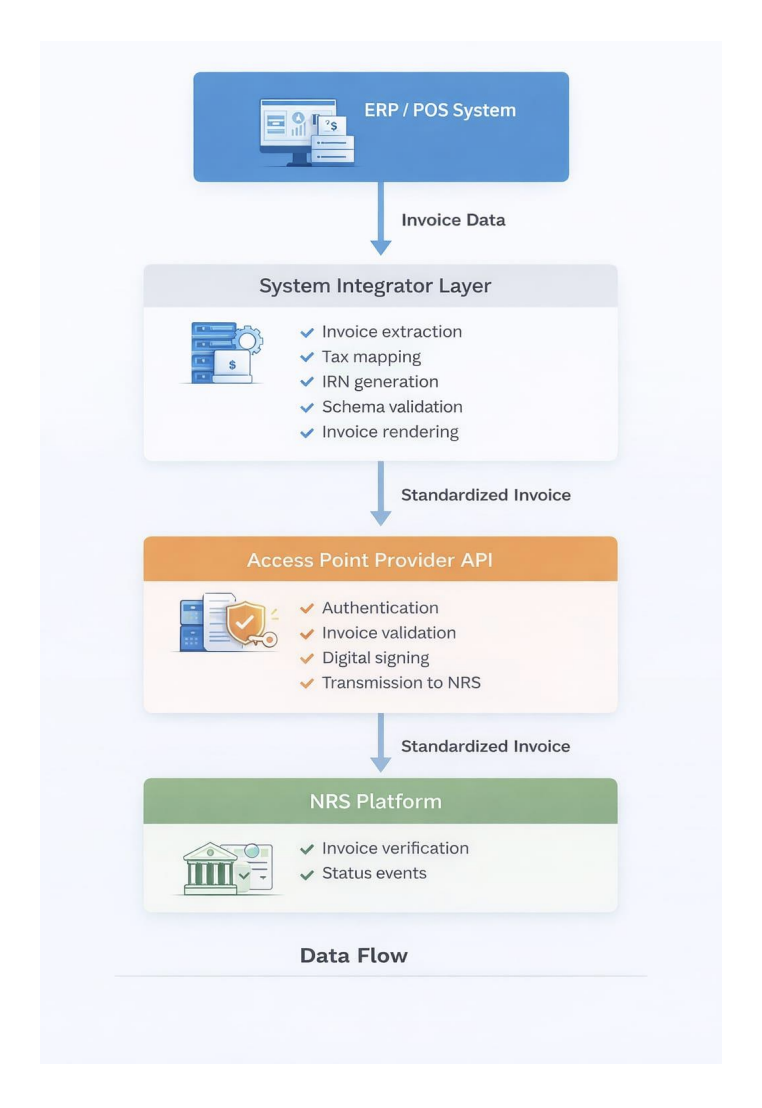
The end-to-end flow from invoice creation to NRS transmission:
- Invoice Created — An invoice is created in the ERP or POS system.
- Standardization (SI) — The Interswitch SI middleware extracts the invoice data, maps tax codes and product codes to NRS standards, generates an IRN, validates the payload against the NRS schema, and converts it to standardized JSON.
- Transmission (APP) — The standardized invoice is submitted to the APP API, which authenticates the request, validates the payload, digitally signs the invoice, and transmits it to NRS.
- QR Code Response — NRS returns a signed response. The platform generates a
QRCodeDatastring which must be stored and printed on the physical invoice to make it NRS-compliant and verifiable. - Status Updates — NRS sends status events back to the platform via webhook. The platform updates the invoice record and notifies relevant parties.
System Architecture
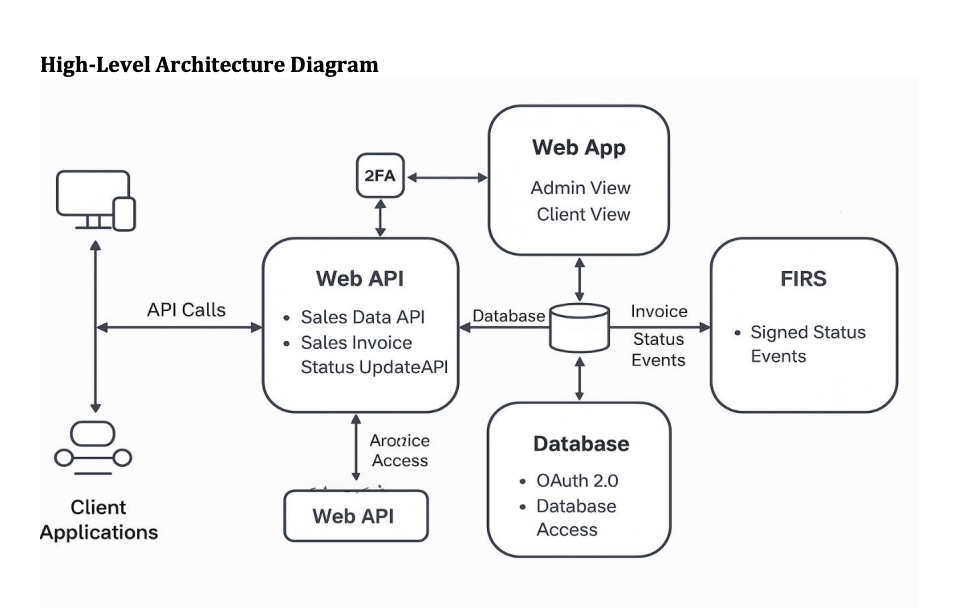
The platform consists of four layers:
| Layer | Description |
|---|---|
| Client Applications | ERP or POS systems where invoices originate |
| System Integrator Layer | Interswitch middleware that extracts, maps, validates, and standardizes invoice data |
| Access Point Provider API | Authenticates, signs, and transmits the standardized invoice to NRS |
| NRS Platform | Verifies the invoice and emits status events |
High Level Architecture
Data flow:
Invoice Standardization
This section covers the System Integrator role — how raw ERP data is transformed into a NRS-compliant invoice before transmission.
Standardization Steps
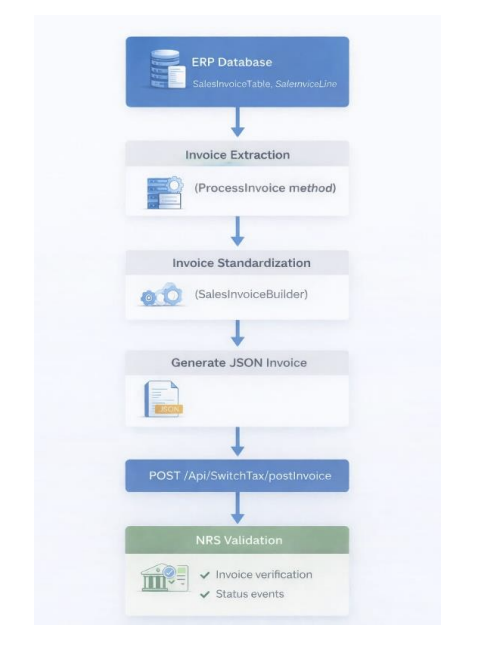
- Invoice is created in the ERP/POS system.
- Invoice data is extracted by the Interswitch middleware.
- ERP tax codes are mapped to NRS tax categories.
- ERP products/services are mapped to NRS product/service codes.
- A unique Invoice Reference Number (IRN) is generated.
- Invoice data is validated against the NRS schema.
- The invoice is converted to standardized JSON format.
- A human-readable invoice is generated.
- The standardized invoice is submitted to the Access Point Provider API.
IRN Generation
The Invoice Reference Number is generated using the following format:
IRN = InvoiceNo + "-" + ServiceId + "-" + InvoiceDate(YYYYMMDD)Example: INV1023-SRV01-20250901
This ensures every IRN is unique per invoice transaction.
ERP Field Mapping
The tables below show how data from ERP system tables is mapped to the standardized NRS invoice JSON fields.
Invoice Header Mapping
| ERP Field | Source Table | Standard Invoice Field | Notes |
|---|---|---|---|
BusinessId | TaxPayerTable | business_id | Unique business identifier |
InvoiceNo | SalesInvoiceTable | irn (part) | Combined with ServiceId and date to form IRN |
ServiceId | TaxPayerTable | irn (part) | Combined with InvoiceNo and date to form IRN |
InvoiceDate | SalesInvoiceTable | issue_date | Invoice issue date |
InvoiceDate | SalesInvoiceTable | due_date | Payment due date |
DocumentType | Derived | invoice_type_code | 381 = Invoice, 380 = Credit Note, 384 = Debit Note |
CurrencyCode | SalesInvoiceTable | document_currency_code | Invoice currency |
CurrencyCode | SalesInvoiceTable | tax_currency_code | Tax currency |
PaymentStatus | SalesInvoiceTable | payment_status | Invoice payment state |
Supplier Mapping
Supplier data is sourced from the Legal Entity table.
| ERP Field | Standard Invoice Field |
|---|---|
BusinessName | accounting_supplier_party.party_name |
TIN | accounting_supplier_party.tin |
Email | accounting_supplier_party.email |
PhoneNo | accounting_supplier_party.telephone |
Sector | accounting_supplier_party.business_description |
Street | accounting_supplier_party.postal_address.street_name |
CityName | accounting_supplier_party.postal_address.city_name |
PostalZone | accounting_supplier_party.postal_address.postal_zone |
Country | accounting_supplier_party.postal_address.country |
Customer Mapping
Customer data is sourced from the Sales Invoice table. Customer information is only included in the payload if a Customer TIN is present.
| ERP Field | Standard Invoice Field |
|---|---|
CustomerName | accounting_customer_party.party_name |
CustomerTIN | accounting_customer_party.tin |
CustomerEmail | accounting_customer_party.email |
CustomerPhoneNo | accounting_customer_party.telephone |
CustomerStreetName | accounting_customer_party.postal_address.street_name |
CustomerCityName | accounting_customer_party.postal_address.city_name |
CustomerPostalZone | accounting_customer_party.postal_address.postal_zone |
CustomerCountry | accounting_customer_party.postal_address.country |
Invoice Line Mapping
Invoice line data is sourced from the Sales Invoice Line table.
| ERP Field | Standard Invoice Field |
|---|---|
HsnCode | invoice_line[].hsn_code |
ItemName | invoice_line[].item.name |
ItemName | invoice_line[].product_category |
HsnCode | invoice_line[].item.sellers_item_identification |
Quantity | invoice_line[].invoiced_quantity |
UnitPriceExcl | invoice_line[].price.price_amount |
UnitOfMeasure | invoice_line[].price.price_unit |
LineAmount | invoice_line[].line_extension_amount |
DiscountRate | invoice_line[].discount_rate |
DiscountAmount | invoice_line[].discount_amount |
Tax Mapping
Tax data is derived from VAT information on ERP invoice lines.
| ERP Field | Standard Invoice Field |
|---|---|
VATAmount | tax_total.tax_amount |
LineAmount | tax_subtotal.taxable_amount |
VATAmount | tax_subtotal.tax_amount |
TaxTypeCode | tax_category.id |
TaxRate | tax_category.percent |
Monetary Total Mapping
Invoice totals are calculated dynamically during standardization.
| Calculation | Standard Invoice Field |
|---|---|
SUM(LineAmount) | legal_monetary_total.line_extension_amount |
SUM(LineAmount) | legal_monetary_total.tax_exclusive_amount |
SUM(LineAmount + VATAmount) | legal_monetary_total.tax_inclusive_amount |
SUM(LineAmount + VATAmount − DiscountAmount) | legal_monetary_total.payable_amount |
Invoice Transmission Flow
Invoice Schema
All invoices must conform to the standardized schema defined by the NRS E-Invoicing platform.
Invoice Header
| Field | Description | Type | Required | Max Length |
|---|---|---|---|---|
business_id | Business UUID | String | Yes | 36 |
irn | Invoice Reference Number | String | Yes | 50 |
invoice_kind | Invoice nature: B2B, B2C, or B2G | String | Yes | 3 |
issue_date | Invoice issue date | Date (YYYY-MM-DD) | Yes | 10 |
due_date | Invoice due date | Date (YYYY-MM-DD) | Yes | 10 |
issue_time | Invoice issue time | Time (HH:mm:ss) | Yes | 8 |
invoice_type_code | Invoice type code | String | Yes | 10 |
tax_point_date | Tax point date | Date (YYYY-MM-DD) | Yes | 10 |
document_currency_code | Document currency | String | Yes | 3 |
tax_currency_code | Tax currency | String | Yes | 3 |
billing_reference[].irn | Original invoice IRN — credit and debit notes only | String | Yes | 50 |
billing_reference[].issue_date | Original invoice issue date — credit and debit notes only | Date (YYYY-MM-DD) | Yes | 10 |
Supplier Information (accounting_supplier_party)
accounting_supplier_party)| Field | Description | Type | Required | Max Length |
|---|---|---|---|---|
party_name | Supplier name | String | Yes | 100 |
tin | Supplier TIN | String | Yes | 20 |
email | Supplier email | String | Yes | 100 |
telephone | Supplier phone | String | Yes | 20 |
business_description | Business description | String | No | 255 |
postal_address.street_name | Street name | String | Yes | 150 |
postal_address.city_name | City | String | Yes | 100 |
postal_address.postal_zone | Postal code | String | No | 20 |
postal_address.country | Country code (ISO 3166-1 alpha-2) | String | Yes | 2 |
Customer Information (accounting_customer_party)
accounting_customer_party)Customer information is only included in the payload if a Customer TIN is present.
| Field | Description | Type | Required | Max Length |
|---|---|---|---|---|
party_name | Customer name | String | Yes | 100 |
tin | Customer TIN (min 5 chars) | String | Yes | 20 |
email | Customer email | String | Yes | 100 |
telephone | Customer phone | String | Yes | 20 |
business_description | Business description | String | No | 255 |
postal_address.street_name | Street name | String | No | 150 |
postal_address.city_name | City | String | Yes | 100 |
postal_address.postal_zone | Postal code | String | No | 20 |
postal_address.country | Country code (ISO 3166-1 alpha-2) | String | Yes | 2 |
Invoice Line Items (invoice_line[])
invoice_line[])| Field | Description | Type | Required |
|---|---|---|---|
hsn_code | Product classification code | String | Yes |
product_category | Product category | String | Yes |
invoiced_quantity | Quantity | Decimal | Yes |
line_extension_amount | Line total amount | Decimal | Yes |
discount_rate | Discount rate | Decimal | No |
discount_amount | Discount amount | Decimal | No |
fee_rate | Fee rate | Decimal | No |
fee_amount | Fee amount | Decimal | No |
item.name | Item name | String | Yes |
item.description | Item description | String | Yes |
item.sellers_item_identification | Item ID | String | Yes |
price.price_amount | Unit price | Decimal | Yes |
price.base_quantity | Base quantity | Decimal | Yes |
price.price_unit | Price unit | String | Yes |
Tax Structure (tax_total[])
tax_total[])| Field | Description | Type | Required |
|---|---|---|---|
tax_amount | Total tax amount | Decimal | Yes |
tax_subtotal[].taxable_amount | Taxable amount | Decimal | Yes |
tax_subtotal[].tax_amount | Tax amount | Decimal | Yes |
tax_subtotal[].tax_category.id | Tax category (e.g. STANDARD_VAT, ZERO_VAT) | String | Yes |
tax_subtotal[].tax_category.percent | Tax rate (%) | Decimal | Yes |
Monetary Totals (legal_monetary_total)
legal_monetary_total)| Field | Description | Type | Required |
|---|---|---|---|
line_extension_amount | Sum of all line amounts | Decimal | Yes |
tax_exclusive_amount | Total before tax | Decimal | Yes |
tax_inclusive_amount | Total after tax | Decimal | Yes |
payable_amount | Final payable amount | Decimal | Yes |
Rendered Invoice Example
The image below shows a sample human-readable tax invoice generated by the platform after a successful submission. The Tax Information section at the bottom contains the IRN and the QR code returned by the API — both must appear on every printed invoice for NRS compliance and verifiability.
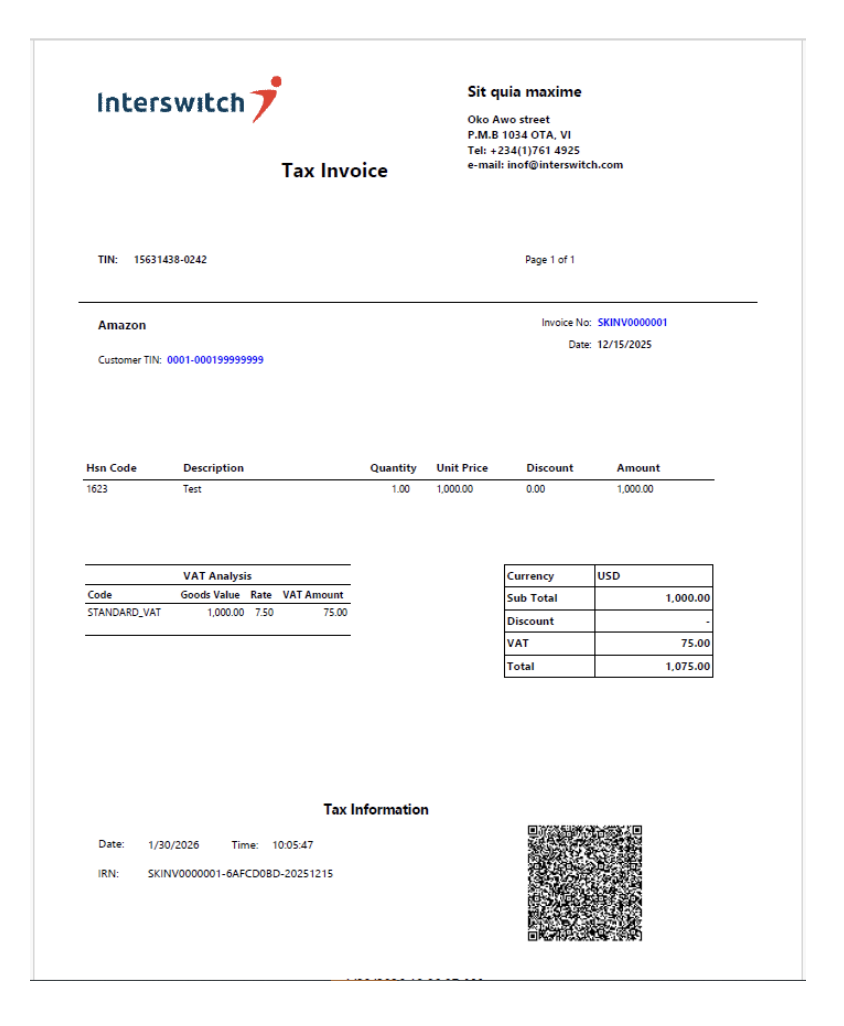
Key elements on the rendered invoice:
- Supplier name, TIN, and address
- Customer name and Customer TIN
- Invoice number and date
- Line items with HSN Code, Description, Quantity, Unit Price, Discount, and Amount
- VAT Analysis table showing tax code, goods value, rate, and VAT amount
- Summary totals: Sub Total, Discount, VAT, and Total
- Tax Information footer containing the transmission Date, Time, IRN, and QR Code
Authentication
All API requests require a Bearer token obtained from the Token endpoint. Tokens expire after 3600 seconds (1 hour) and must be refreshed by calling the endpoint again.
Get Access Token
POST /Api/SwitchTax/Token
Request
{
  "ClientId": "TEST001",
  "ClientSecret": "RTR56457%4k"
}
Response
{
  "Token": "eyJhbGciOiJIUzI1NiIsInR5cCI6IkpXVCJ9...",
  "token_type": "bearer",
  "expires_in": 3600
}
Use the returned token in the Authorization header on all subsequent requests:
Authorization: Bearer <Token>API Reference
This section covers the Access Point Provider role — the endpoints used to transmit, manage, and reconcile invoices with NRS.
Endpoints Summary
| Endpoint | Method | Purpose |
|---|---|---|
/Api/SwitchTax/Token | POST | Generate an access token |
/Api/SwitchTax/postInvoice | POST | Submit an invoice to NRS |
/Api/SwitchTax/UpdateStatus | POST | Update an invoice's payment status |
/Api/SwitchTax/transmit/{IRN} | POST | Manually trigger transmission of a specific invoice |
/Api/SwitchTax/PostQueuedInvoices | POST | Transmit all queued invoices for a TIN within a date range |
/Api/SwitchTax/entity/{id} | GET | Get a single NRS entity record by entity id |
/Api/SwitchTax/searchTin/{tin} | GET | Search for an entity/business by TIN |
/Api/SwitchTax/RegisterTaxpayerAggregator | POST | Register a taxpayer under an Aggregator |
/Api/SwitchTax/GetAggregatorTaxPayers/{aggregatorId} | GET | List taxpayers registered under an Aggregator |
/Api/SwitchTax/MoveToProduction | POST | Move a taxpayer from sandbox to production |
Post Invoice
Submits a standardized invoice to NRS. The platform authenticates, validates, digitally signs, and transmits the invoice, then returns a QR code on success.
The same endpoint handles both standard invoices, debit notes and credit notes. Credit and Debit notes require an additional billing_reference array linking to the original invoice.
Invoice Type Codes
| Code | Description |
|---|---|
380 | Credit Note |
381 | Default: Sales Invoice |
384 | Debit Note |
Tax Category Codes
| Code |
|---|
STANDARD_VAT |
ZERO_VAT |
EXEMPTED |
Withholding_Tax |
Stamp_Duty |
Price Unit Codes
Examples of supported price unit codes include:
| Code | Description |
|---|---|
EA | Each |
KGM | Kilogram |
LTR | Litre |
N/BNRS now allows the incorporation number to be used as a customer identifier in B2B scenarios.
POST /Api/SwitchTax/postInvoice
Sample Request
{
  "business_id": "1c6eaf77-d0bd-455c-9c5c-500a3f1dbfb2",
  "irn": "SN000016-6AF0BD-20260615",
  "invoice_kind": "B2B",
  "issue_date": "2026-06-15",
  "due_date": "2026-06-15",
  "issue_time": "08:52:57",
  "invoice_type_code": "381",
  "payment_status": "PENDING",
  "tax_point_date": "2026-06-15",
  "document_currency_code": "NGN",
  "tax_currency_code": "NGN",
  "accounting_supplier_party": {
    "party_name": "Sit quia maxime",
    "tin": "15631438-0242",
    "email": "[email protected]",
    "telephone": "+234784848884",
    "business_description": "Technology",
    "postal_address": {
      "street_name": "Oko Awo",
      "city_name": "Lagos",
      "postal_zone": "",
      "country": "NG"
    }
  },
  "accounting_customer_party": {
    "party_name": "Verve International",
    "tin": "15631438-0242",
    "email": "[email protected]",
    "telephone": "+773838888",
    "business_description": null,
    "postal_address": {
      "street_name": "Ako Awo",
      "city_name": "Lagos",
      "postal_zone": "",
      "country": "NG"
    }
  },
  "invoice_line": [
    {
      "isic_code": "0114",
      "service_category": "Sugar Cane growing",
      "discount_rate": 0.00,
      "discount_amount": 0.00,
      "fee_rate": 0.0,
      "fee_amount": 0.0,
      "invoiced_quantity": 100.00,
      "line_extension_amount": 100000.00,
      "item": {
        "name": "Sugar Cane growing",
        "description": "100.00 Each at 1000.00 each",
        "sellers_item_identification": "0114"
      },
      "price": {
        "price_amount": 1000.00,
        "base_quantity": 1,
        "price_unit": "EA"
      }
    },
    {
      "hsn_code": "2523.10",
      "product_category": "Cement clinkers",
      "discount_rate": 0.00,
      "discount_amount": 0.00,
      "fee_rate": 0.0,
      "fee_amount": 0.0,
      "invoiced_quantity": 4000.00,
      "line_extension_amount": 8000000.00,
      "item": {
        "name": "Cement clinkers",
        "description": "4000.00 Each at 2000.00 each",
        "sellers_item_identification": "2523.10"
      },
      "price": {
        "price_amount": 2000.00,
        "base_quantity": 1,
        "price_unit": "EA"
      }
    }
  ],
  "tax_total": [
    {
      "tax_amount": 7500.00,
      "tax_subtotal": [
        {
          "taxable_amount": 100000.00,
          "tax_amount": 7500.00,
          "tax_category": {
            "id": "STANDARD_VAT",
            "percent": 7.50
          }
        },
        {
          "taxable_amount": 8000000.00,
          "tax_amount": 0.00,
          "tax_category": {
            "id": "ZERO_VAT",
            "percent": 0.00
          }
        }
      ]
    }
  ],
  "legal_monetary_total": {
    "line_extension_amount": 8100000.00,
    "tax_exclusive_amount": 8100000.00,
    "tax_inclusive_amount": 8107500.00,
    "payable_amount": 8107500.00
  }
}
For credit and debit notes, include a billing_reference array in the request body:
{
  "business_id": "1c6eaf77-d0bd-455c-9c5c-500a3f1dbfb2",
  "irn": "SN000016-6AFCD0BD-20260615",
  "invoice_kind": "B2B",
  "issue_date": "2026-06-15",
  "due_date": "2026-06-15",
  "issue_time": "08:52:57",
  "invoice_type_code": "380",
  "payment_status": "PAID",
  "tax_point_date": "2026-06-15",
  "document_currency_code": "NGN",
  "tax_currency_code": "NGN",
  "billing_reference": [
        {
            "irn": "ITW001-E9E0C0D3-20250619",
            "issue_date": "2025-05-14"
        }
    ],
  "accounting_supplier_party": {
    "party_name": "Sit quia maxime",
    "tin": "15631438-0242",
    "email": "[email protected]",
    "telephone": "+234784848884",
    "business_description": "Technology",
    "postal_address": {
      "street_name": "Oko Awo",
      "city_name": "Lagos",
      "postal_zone": "",
      "country": "NG"
    }
  },
  "accounting_customer_party": {
    "party_name": "Verve International",
    "tin": "15631438-0242",
    "email": "[email protected]",
    "telephone": "+773838888",
    "business_description": null,
    "postal_address": {
      "street_name": "Ako Awo",
      "city_name": "Lagos",
      "postal_zone": "",
      "country": "NG"
    }
  },
  "invoice_line": [
    {
      "isic_code": "0114",
      "service_category": "Sugar Cane growing",
      "discount_rate": 0.00,
      "discount_amount": 0.00,
      "fee_rate": 0.0,
      "fee_amount": 0.0,
      "invoiced_quantity": 100.00,
      "line_extension_amount": 100000.00,
      "item": {
        "name": "Sugar Cane growing",
        "description": "100.00 Each at 1000.00 each",
        "sellers_item_identification": "0114"
      },
      "price": {
        "price_amount": 1000.00,
        "base_quantity": 1,
        "price_unit": "EA"
      }
    },
    {
      "hsn_code": "2523.10",
      "product_category": "Cement clinkers",
      "discount_rate": 0.00,
      "discount_amount": 0.00,
      "fee_rate": 0.0,
      "fee_amount": 0.0,
      "invoiced_quantity": 4000.00,
      "line_extension_amount": 8000000.00,
      "item": {
        "name": "Cement clinkers",
        "description": "4000.00 Each at 2000.00 each",
        "sellers_item_identification": "2523.10"
      },
      "price": {
        "price_amount": 2000.00,
        "base_quantity": 1,
        "price_unit": "EA"
      }
    }
  ],
  "tax_total": [
    {
      "tax_amount": 7500.00,
      "tax_subtotal": [
        {
          "taxable_amount": 100000.00,
          "tax_amount": 7500.00,
          "tax_category": {
            "id": "STANDARD_VAT",
            "percent": 7.50
          }
        },
        {
          "taxable_amount": 8000000.00,
          "tax_amount": 0.00,
          "tax_category": {
            "id": "ZERO_VAT",
            "percent": 0.00
          }
        }
      ]
    }
  ],
  "legal_monetary_total": {
    "line_extension_amount": 8100000.00,
    "tax_exclusive_amount": 8100000.00,
    "tax_inclusive_amount": 8107500.00,
    "payable_amount": 8107500.00
  }
}
{
  "business_id": "1c6eaf77-d0bd-455c-9c5c-500a3f1dbfb2",
  "irn": "SN000016-6AFCD0BD-20260615",
  "invoice_kind": "B2B",
  "issue_date": "2026-06-15",
  "due_date": "2026-06-15",
  "issue_time": "08:52:57",
  "invoice_type_code": "384",
  "payment_status": "PAID",
  "tax_point_date": "2026-06-15",
  "document_currency_code": "NGN",
  "tax_currency_code": "NGN",
  "billing_reference": [
        {
            "irn": "ITW001-E9E0C0D3-20250619",
            "issue_date": "2025-05-14"
        }
    ],
  "accounting_supplier_party": {
    "party_name": "Sit quia maxime",
    "tin": "15631438-0242",
    "email": "[email protected]",
    "telephone": "+234784848884",
    "business_description": "Technology",
    "postal_address": {
      "street_name": "Oko Awo",
      "city_name": "Lagos",
      "postal_zone": "",
      "country": "NG"
    }
  },
  "accounting_customer_party": {
    "party_name": "Verve International",
    "tin": "15631438-0242",
    "email": "[email protected]",
    "telephone": "+773838888",
    "business_description": null,
    "postal_address": {
      "street_name": "Ako Awo",
      "city_name": "Lagos",
      "postal_zone": "",
      "country": "NG"
    }
  },
  "invoice_line": [
    {
      "isic_code": "0114",
      "service_category": "Sugar Cane growing",
      "discount_rate": 0.00,
      "discount_amount": 0.00,
      "fee_rate": 0.0,
      "fee_amount": 0.0,
      "invoiced_quantity": 100.00,
      "line_extension_amount": 100000.00,
      "item": {
        "name": "Sugar Cane growing",
        "description": "100.00 Each at 1000.00 each",
        "sellers_item_identification": "0114"
      },
      "price": {
        "price_amount": 1000.00,
        "base_quantity": 1,
        "price_unit": "EA"
      }
    },
    {
      "hsn_code": "2523.10",
      "product_category": "Cement clinkers",
      "discount_rate": 0.00,
      "discount_amount": 0.00,
      "fee_rate": 0.0,
      "fee_amount": 0.0,
      "invoiced_quantity": 4000.00,
      "line_extension_amount": 8000000.00,
      "item": {
        "name": "Cement clinkers",
        "description": "4000.00 Each at 2000.00 each",
        "sellers_item_identification": "2523.10"
      },
      "price": {
        "price_amount": 2000.00,
        "base_quantity": 1,
        "price_unit": "EA"
      }
    }
  ],
  "tax_total": [
    {
      "tax_amount": 7500.00,
      "tax_subtotal": [
        {
          "taxable_amount": 100000.00,
          "tax_amount": 7500.00,
          "tax_category": {
            "id": "STANDARD_VAT",
            "percent": 7.50
          }
        },
        {
          "taxable_amount": 8000000.00,
          "tax_amount": 0.00,
          "tax_category": {
            "id": "ZERO_VAT",
            "percent": 0.00
          }
        }
      ]
    }
  ],
  "legal_monetary_total": {
    "line_extension_amount": 8100000.00,
    "tax_exclusive_amount": 8100000.00,
    "tax_inclusive_amount": 8107500.00,
    "payable_amount": 8107500.00
  }
}
Response
{
  "code": 201,
  "message": "Transmitted successfully",
  "data": {
    "IRN": "SV0000014-6AFCD0BD-20260301",
    "PostingDateTime": "2026-03-01 22:28:24",
    "QRCodeData": "Base64EncodedQRCode"
  }
}
The
QRCodeDatafield contains a Base64-encoded QR code. Decode it, store it against the invoice record, and render it on the printed invoice.
Update Invoice Status
Updates the payment status of a previously submitted invoice.
POST /UpdateStatus
Request
{
  "payment_status": "PAID",
  "reference": "payment_reference_or_note",
  "irn": "NISW008608-6AFCD0BD-20250930"
}
{
"payment_status": "PARTIAL",
"reference": "payment_reference_or_note", // optional
"amount": 10
}Response
{
  "invoiceId": "INV-2025-001",
  "status": "ACCEPTED",
  "timestamp": "2025-07-01T12:00:00Z"
}
Transmit Invoice
Manually triggers transmission of a specific invoice to NRS by IRN.
POST /transmit/{IRN}
Response
{
  "code": 200,
  "data": {
    "ok": true
  }
}
Post Queued Invoices
Transmits all invoices that have been queued but not yet sent to NRS for a given TIN, within a specified date range.
POST /PostQueuedInvoices
Request
{
  "tin": "15631438-0242",
  "startDate": "2025-05-01",
  "endDate": "2025-12-31"
}
Response
{
  "code": "200",
  "message": "Transmitted successfully",
  "InvoicesPosted": [
    {
      "IRN": "ITW005-6AFCD0BD-20250730",
      "PostingDateTime": "2025-11-17 21:04:34",
      "QRCodeData": "Z4QjuUDN8CY..."
    },
    {
      "IRN": "ITW009-6AFCD0BD-20250730",
      "PostingDateTime": "2025-11-17 21:04:34",
      "QRCodeData": "PiiEpggiZF0..."
    }
  ]
}
Business & Entity Lookups
This section covers the endpoints used to look up NRS entities and taxpayers, register taxpayers under an Aggregator, and manage taxpayer go-live status.
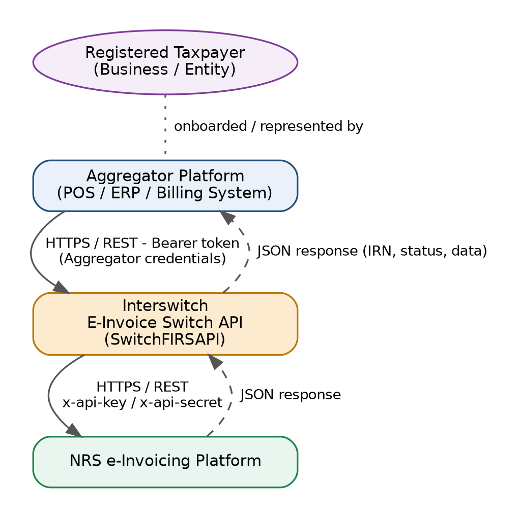
Flow
The Entity / TIN lookup flow lets an Aggregator resolve NRS entity records, search for taxpayers by TIN, register taxpayers for transaction processing, and move them to production once cleared by NRS.
Get Entity by ID
Returns a single NRS entity record, including its nested businesses, by entity id. Requires a Bearer token.
GET /Api/SwitchTax/entity/{id}
Path Parameters
| Field | Description |
|---|---|
id | The NRS entity id (not a business_id — see Section 4.3). |
Example Request
GET {baseUrl}/Api/SwitchTax/entity/123e4567-e89b-12d3-a456-426614174000
Authorization: Bearer {{token}}
Response
Returns the NRS entity record in the standard response envelope (code, message, data).
Search TIN
Finds the entity/business record matching a given TIN. NRS itself only supports searching entities by reference, so this endpoint fetches a page of entities and filters the result down to whichever one has a matching TIN, rather than returning the full unfiltered list.
GET /Api/SwitchTax/searchTin/{tin}
Path Parameters
| Field | Description |
|---|---|
tin | The Tax Identification Number to search for. |
Example Request
GET {baseUrl}/Api/SwitchTax/searchTin/00490728-0001
Authorization: Bearer {{token}}
Response
Returns 200 with the matching entity/entities if found, or 404 if no entity's businesses contain that TIN.
Register Taxpayer Aggregator
Registers (links) a taxpayer, identified by TIN, under the calling Aggregator so the Aggregator can transact on that taxpayer's behalf. Call it once per taxpayer during onboarding, before submitting invoices for them. Requires a Bearer token.
POST /Api/SwitchTax/RegisterTaxpayerAggregator
Request Body
| Field | Type | Description |
|---|---|---|
tin | string | Tax Identification Number of the taxpayer being registered, e.g. 004907280001. |
AggregatorId | string | The Aggregator's identifier, issued by Interswitch at onboarding, e.g. B45BMQRSIE. |
Request Example
{
  "tin": "00490728-0001",
  "AggregatorId": "B45BMQRSIE"
}
Response
Returns the standard response envelope (see Error Reference). Check the code field for success; an error.details message explains any rejection (for example, an unknown TIN or AggregatorId).
Get Aggregator Taxpayers
Returns the taxpayers currently registered under an Aggregator — that is, those linked via POST /RegisterTaxpayerAggregator. Use it to confirm a registration succeeded or to list the taxpayers the Aggregator can submit invoices for. Requires a Bearer token.
GET /Api/SwitchTax/GetAggregatorTaxPayers/{aggregatorId}
Path Parameters
| Field | Description |
|---|---|
aggregatorId | The Aggregator's identifier, e.g. B45BMQRSIE. |
Example Request
GET {baseUrl}/Api/SwitchTax/GetAggregatorTaxPayers/B45BMQRSIE
Authorization: Bearer {{token}}
No request body is required — the Aggregator is identified by the path parameter only. The response uses the standard envelope, with the linked taxpayer records in data.
Move Taxpayer to Production
Moves one of the Aggregator's taxpayers from the test (sandbox) environment to production. Call it once the taxpayer is ready to go live. The Aggregator is identified from the Bearer token, and only taxpayers registered under that Aggregator can be moved. Requires a Bearer token.
Important: A successful move permanently deletes the taxpayer's test (sandbox) invoices, and this cannot be undone. Make sure any test data you need has been retained before calling this endpoint. A taxpayer that is already Live cannot be moved again.
POST /Api/SwitchTax/MoveToProduction
Request Body
| Field | Type | Description |
|---|---|---|
tin | string | Tax Identification Number of the taxpayer to move to production, e.g. 800490728-0001. The taxpayer must be registered under the calling Aggregator. |
Request Example
POST {baseUrl}/Api/SwitchTax/MoveToProduction
Authorization: Bearer {{token}}
Content-Type: application/json

{
  "tin": "800490728-0001"
}
Responses
| HTTP Status | Condition | Message |
|---|---|---|
200 | Taxpayer moved to production. | Taxpayer successfully moved to production. |
400 | tin was not supplied. | TIN is required. |
401 | Missing, invalid or expired Bearer token. | Re-authenticate via POST /Token. |
403 | The calling client is not a registered Aggregator. | The calling client is not registered as an aggregator. |
404 | The TIN is not registered under your Aggregator account. The same response is returned if the TIN belongs to another Aggregator. | Taxpayer not found under your aggregator account. |
409 | The taxpayer is already in production (Live). The request is rejected and nothing is changed. | Taxpayer is already in production. |
422 | The taxpayer has not been cleared for go-live. | Taxpayer is not yet ready for go-live. Please switch the taxpayer to Production on the NRS E-Invoicing platform and select Interswitch as the Access Point Provider (APP), then try again. |
500 | Unexpected error. The move is all-or-nothing, so nothing is changed on failure. | An unexpected error occurred while moving the taxpayer to production. |
Error Reference
All errors follow a standard structured response format. The details or error_description field contains the specific reason for the failure.
Authentication Errors
Invalid or expired token —401 Unauthorized
{
  "error": "invalid_token",
  "error_description": "The access token is invalid or has expired."
}
Validation Errors
Missing required field —400 Bad Request
{
  "errorCode": "400",
  "errorMessage": "Validation Failed",
  "details": "CustomerTIN is required."
}
Schema validation failed —422 Unprocessable Entity
{
  "errorCode": "422",
  "errorMessage": "Schema validation failed",
  "details": "InvoiceDate must be in YYYY-MM-DD format."
}
Duplicate IRN —400 Bad Request
{
  "code": 400,
  "data": null,
  "message": "error has occurred",
  "error": {
    "id": "96b4a6dc-ab2c-403e-adec-8a4c0200d87e",
    "handler": "invoice_actions",
    "details": "unable to complete this operation at this time, kindly try again later",
    "public_message": "validation failed: we are unable to process your request. also confirm this is not a duplicate request"
  }
}
Invalid Business ID —400 Bad Request
{
  "code": 400,
  "data": null,
  "message": "error has occurred",
  "error": {
    "id": "d64ba7c8-e62e-4b3a-aa55-12f49226fcad",
    "handler": "invoice_actions",
    "details": "invalid UUID length: 35",
    "public_message": "validation failed: we are unable to process your request. also confirm this is not a duplicate request"
  }
}
Invalid tax category —400 Bad Request
{
  "code": 400,
  "data": null,
  "message": "error has occurred",
  "error": {
    "id": "a4f0d39d-5780-492f-9f0d-e11cc6acfad2",
    "handler": "invoice_actions",
    "details": "invoicerequest.invoice.taxtotal[0].taxsubtotal[0].taxcategory.id must be a valid tax category, refer to the invoice resource apis",
    "public_message": "validation failed: we are unable to process your request. also confirm this is not a duplicate request"
  }
}
Invalid tax point date —400 Bad Request
{
  "code": 400,
  "data": null,
  "message": "error has occurred",
  "error": {
    "id": "bbeaab9c-6a28-4ca6-b2fe-9bb82406f01a",
    "handler": "invoice_actions",
    "details": "invoicerequest.invoice.taxpointdate must be a valid date value yyyy-mm-dd (e.g: 2024-04-29)",
    "public_message": "validation failed: we are unable to process your request. also confirm this is not a duplicate request"
  }
}
Invalid country code —400 Bad Request
{
  "code": 400,
  "data": null,
  "message": "error has occurred",
  "error": {
    "id": "2b2775ae-1b7b-4fb7-9124-dcac8e670996",
    "handler": "invoice_actions",
    "details": "invoicerequest.invoice.accountingsupplierparty.postaladdress.country must be a valid country code, refer to the invoice resource apis",
    "public_message": "validation failed: we are unable to process your request. also confirm this is not a duplicate request"
  }
}
Invalid TIN —400 Bad Request
{
  "code": 400,
  "data": null,
  "message": "error has occurred",
  "error": {
    "id": "8172fe11-e6b7-4c10-af5c-57d3a920a832",
    "handler": "invoice_actions",
    "details": "invoicerequest.invoice.accountingcustomerparty.tin must be at least in length or value 5",
    "public_message": "validation failed: we are unable to process your request. also confirm this is not a duplicate request"
  }
}
Queued Invoice Errors
Invalid TIN
{
  "code": "400",
  "message": "Invalid TIN"
}
No queued invoices found
{
  "code": "400",
  "message": "There are no queued invoices pending to be transmitted"
}
Aggregator & Lookup Errors
The following response patterns apply to the Business & Entity Lookup endpoints (/entity/{id}, /searchTin/{tin}, /RegisterTaxpayerAggregator, /GetAggregatorTaxPayers/{aggregatorId}, /MoveToProduction):
| HTTP Status | Meaning | Typical Scenario |
|---|---|---|
400 | Bad request — a required field was missing or malformed. | tin missing in POST /MoveToProduction; invalid request body. |
401 | Missing, invalid, or expired Bearer token. | Re-authenticate via POST /Token. |
403 | The caller is not permitted to perform the action. | POST /MoveToProduction called by a client that is not a registered Aggregator. |
404 | The referenced resource (entity, TIN, business) was not found. | TIN not registered under your Aggregator account; no entity contains the searched TIN. |
409 | Conflict — the request cannot be applied in the current state. | POST /MoveToProduction for a taxpayer that is already in production. |
422 | The request was understood but the resource is not ready. | POST /MoveToProduction for a taxpayer not yet cleared for go-live on the NRS platform. |
500 | An unexpected error occurred while processing the request. | Safe to retry with backoff; contact support if persistent. |
Always log the full response body on error, not just the HTTP status — the error object typically carries a more specific details / public_message than the status code alone conveys.
Server Errors
Internal server error —500
{
  "errorCode": "500",
  "errorMessage": "An unexpected error occurred. Please try again later.",
  "supportId": "b7f4c7d2-82f3-4a3e-b9f5-0a12345xyz"
}
NRS system unavailable —500
{
  "code": "500",
  "message": "NRS system is currently offline. Please try again later"
}
HTTP Status Codes
| Status Code | Meaning | Typical Scenario |
|---|---|---|
200 OK | Request successful | Invoice submitted, status updated, token generated |
201 Created | Resource created | New invoice or client record created |
400 Bad Request | Invalid input | Missing required field, duplicate IRN, malformed JSON |
401 Unauthorized | Authentication failed | Invalid or expired access token |
403 Forbidden | Access denied | Client lacks permission for the resource |
404 Not Found | Resource not found | Invalid endpoint or record not found |
409 Conflict | Request conflicts with state | Taxpayer already in production |
422 Unprocessable Entity | Validation failed | Schema or business rule validation error |
429 Too Many Requests | Rate limit exceeded | Client exceeded request quota |
500 Internal Server Error | Unexpected server error | Unhandled exception, NRS system offline |
503 Service Unavailable | Service temporarily unavailable | Scheduled downtime or overload |
Security & Compliance
| Feature | Detail |
|---|---|
| Authentication | OAuth 2.0 Client Credentials flow with role-based access |
| Login Security | 2FA enabled for all web application logins |
| Data in Transit | TLS 1.3 |
| Data at Rest | Database encryption |
| Invoice Integrity | Digital signing of all invoices before transmission |
| Audit | Full logging of all API calls and actions |
| Compliance | NRS e-invoicing regulations and Nigerian data protection laws |
Messaging and Routing Protocols
Messaging Protocol
The Interswitch NRS E-Invoicing platform uses a secure REST-based messaging protocol over HTTPS to exchange invoice data between system components.
Protocol Specifications
• Transport Protocol: HTTPS (TLS 1.2 or higher)
• Message Format: JSON (application/json)
• Encoding: UTF-8
• Communication Pattern: Synchronous request/response with asynchronous status
updates
Message Flow Architecture
The platform follows a layered messaging model:
ERP/POS → System Integrator (SI) → Access Point Provider (APP) → NRS Platform
Flow Description
- ERP/POS Layer
o Generates raw invoice data
o Sends invoice data to the SI layer - System Integrator (SI)
o Standardizes invoice into NRS schema
o Generates IRN
o Performs schema validation
o Routes standardized message to APP API
o Generates QR code data for verification - Access Point Provider (APP)
o Authenticates client requests
o Digitally signs invoice payload
o Routes message to NRS platform - NRS Platform
o Validates and processes invoice
o Returns compliance response
Routing Protocol
Routing determines how messages are directed between components.
Endpoint-Based Routing
Routing is performed based on API endpoints:
Operation Endpoint
Authentication /Api/SwitchTax/Token
Invoice Submission /Api/SwitchTax/postInvoice
Status Update /Api/SwitchTax/UpdateStatus
Internal Routing Logic
• Requests are routed using:
o API endpoint path
o Authenticated client identity
• APP acts as the routing gateway, forwarding:
o SI → APP → NRS
o NRS → APP → SI (response)
Message Identification and Traceability
Each message is uniquely identifiable using:
• IRN (Invoice Reference Number) – primary transaction identifier
• Timestamp – request time
• Client ID – originating system
This ensures:
• End-to-end traceability
• Audit compliance
• Duplicate prevention
Delivery Modes
Synchronous Processing
• Used for invoice submission
• Immediate response returned:Success / Failure
IRN
QR Code
Asynchronous Updates
• Transmit supports both asynchronous and synchronous processing
• Supported via:
o Status API (/UpdateStatus)
o Webhook notifications
Message Security
Authentication
• OAuth 2.0 (Client Credentials Flow)
Transport Security
• HTTPS with TLS 1.2+
Data Integrity
• Digitally signed invoices at APP layer before submission to NRS
Error Handling and Routing Failures
If routing fails at any stage:
• SI retries submission to APP
• APP returns structured error response
• Failed messages are logged for reprocessing
Retry Strategy
• Maximum retries: 3 attempts
• Backoff strategy:
o Immediate retry
o 5 seconds
o 15 seconds
Idempotency
To prevent duplicate processing:
• IRN is used as a unique transaction key
• Duplicate submissions with same IRN are rejected.
High-Volume Processing Consideration
The platform supports scalable processing through:
• Parallel invoice processing
• Logical routing per taxpayer (TIN-based processing)
Updated 2 days ago