
Send Cross Border Payments
Learn how to send cross-border payments on behalf of your customers.
1. Overview
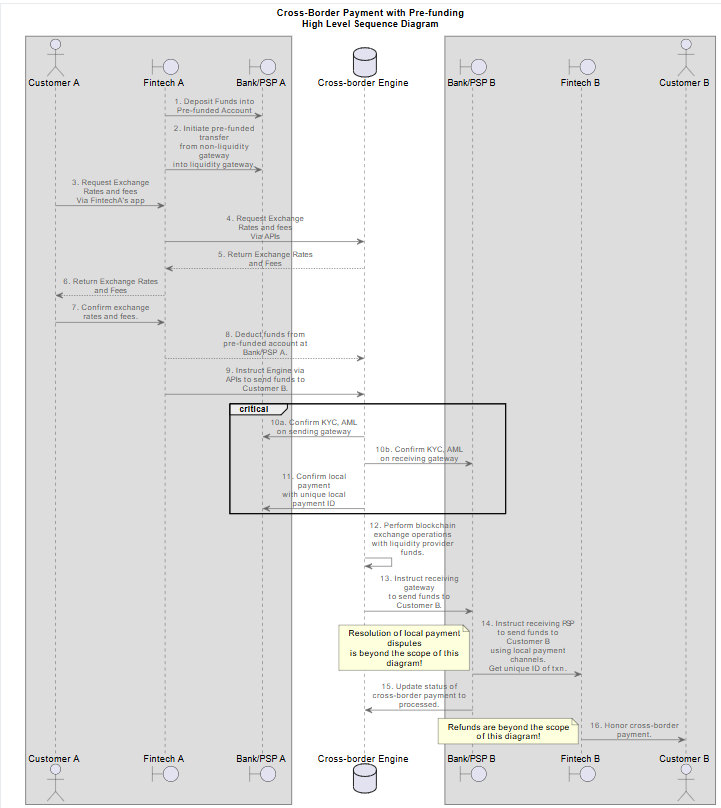
Performing cross-border payments on behalf of your users is a two-step process.
First, you create a payment intent. The cross-border payment engine will return rates, fees, and KYC and name-verification checks.
Secondly, you make a payment using the parameters obtained in step 1, with additional security measures.
Note that you can only specify the recipient amount, not the sender amount. The expected sender amount will be calculated and returned to you in the API response.
Only payment gateways can initiate payment intents and confirm payments.
Your bank will either be classified as a liquidity gateway, a non-liquidity gateway, or a terminating gateway.
Non-liquidity gateways and terminating gateways rely on a parent liquidity gateway to honor cross-border transactions.
If your gateway can terminate to other gateways (banks, wallets, mobile money …), it will be set up as a liquidity gateway.
Even though non-liquidity gateways don’t hold liquidity from liquidity providers, they can honor cross-border payments on behalf of their own customers.
A gateway set up as a terminating gateway will rely on its parent gateway to process the transfer of funds to its customers.
1.1 Pre-Funding Mechanism
This applies only to non-liquidity gateways. Terminating gateways are not affected.
Under the pre-funding model utilized by ERM, instant value transfer occurs from a non-liquidity gateway to a liquidity gateway. The non-liquidity gateway deposits funds into the liquidity gateway, which are then utilized for cross-border payments. Any cross-border payment initiated by the non-liquidity gateway will be deducted from the pre-funded account.
1.2 Liquidity Gateways.
Liquidity gateways hold funds on behalf of liquidity providers and can transact directly with the cross-border payment engine.
If the sender is found in the Liquidity Gateway, the flow is as follows:
SENDER -> Liquidity Gateway -> PIPEChain
1.3 Non-Liquidity Gateways.
Non-liquidity gateways, on the other hand, will always have to reference liquidity gateways to perform cross-border payments.
If the sender is found in the Non-Liquidity Gateway, the flow is as follows:
SENDER -> Non-Liquidity Gateway -> Liquidity Gateway -> PIPEChain
1.4 Terminating Gateways.
Terminating gateways cannot process transactions on their own and rely on a parent gateway to honor cross-border payments.
If the receiver is found in a terminating gateway, the flow is as follows:
PIPEChain -> Parent Gateway -> Terminating Gateway -> Receiver Account
2. Endpoints
| Environment | Resource | Endpoint |
|---|---|---|
| staging | Authentication Token | https://id.pipechain-testnet.stargate.is/realms/interswitch-dev/protocol/openid-connect/token |
| staging | Api | https://dev-api-pipechain.qa.interswitchng.com |
3. API Calls
3.1 Create a payment intent
POST /v2/payment-intents
//Create a new unsigned payment intent

{

"senderGatewayId": “[string] Payment Gateway ID of the sender.”,

"senderCurrency": “[string] Currency used by the sender.”,

"senderAccount": “[string] Sender Account.”,

"receiverGatewayId": “[string] Payment Gateway ID of the receiver.”,

"receiverAccount": “[string] Receiver account.”,

"receiverCurrency": “[string] Currency used by the receiver.”,

"receiverAmount": “[string] Amount in receiver currency the destination will receive.”,

"memo": “[string] memo associated with the payment.”,

"productType": “[string] (Optional): Type of product associated with the payment. Interswitch will provide this value when applicable.”

}
3.2 Confirm a payment.
POST /v2/payments

//Creates a new signed payment
{

"senderGatewayId": “[string] Payment Gateway ID of the sender.”,

"senderCurrency": “[string] Currency used by the sender.”,

"senderAccount": “[string] Sender Account.”,

"receiverGatewayId": “[string] Payment Gateway ID of the receiver.”,

"receiverAccount": “[string] Receiver account.”,

"receiverCurrency": “[string] Currency used by the receiver.”,

"receiverAmount": “[string] Amount in receiver currency the destination will receive.”,

"memo": “[string] Memo associated with the payment.”,

"senderAmount": “[string] Amount sender has to pay, excluding sender fees.”,

"senderName": “[string] Name of the sender.”,

"receiverName": “[string] Name of the receiver.”,

"receivingGatewayFee": “[string] Amount in receiver currency charged by the receiving gateway.”,

"senderGatewayTransactionId": “[string] Transaction id generated by the sending gateway when sending a payment.”,

"senderGatewayTransactionChannel": “[string] Transaction channel used to perform payment. Use the value local for liquidity gateways. And pre-funded for non-liquidity gateway.”,

"productType": “[string] Type of product associated with the payment. If not provided during payment intent, the default value is account to account”,

"liqudityProviderId": “[string] Liqudity Provider ID. Required for certain gateways”,

"receiverBankCode": “[string] Receiver Bank Code. Required for certain gateways”,

"senderBankCode": “[string] Sender Bank Code. Required for certain gateways”,

}
4. Try it out:
You will need to obtain the value for the X_INTERSTELLAR_ERM_API_KEY header required below. Kindly contact the product owner to get or generate this API key for you. See the section on API Keys for more details
For this demo, use the following:
export X_INTERSTELLAR_ERM_API_KEY=ocQPTBQUdhpCOeBznkJc8sM2rVu4iTFg4.1 Task
Let's send fake 1,000 Naira from the fictive customer SENDER_ACCOUNT at the fictive Nigerian bank.ng.bank.demo.ngn, to the fictive customerRECEIVER_ACCOUNT at the fictive Ghanaian bank.gh.bank.demo.ghs, who will receive funds in Ghana cedis.
4.2 Tools you might need
These are the tools you might need to follow along with this tutorial.
-
linuxormac: Many of the command line examples have been customized for UNIX-like operating systems. -
curl: To perform API calls.- mac:
brew install curl - ubuntu/debian:.
sudo apt-get install curl
- mac:
-
jq: To process JSON on the command line.
- mac:
brew install jq - ubuntu/debian:.
sudo apt-get install jq
- mac:
-
jo: To create JSON on the command line.
- mac:
brew install jo - ubuntu/debian:.
sudo apt-get install jo
- mac:
-
openssl: To perform cryptographic operations on the command line.
- mac:
brew install openssl - ubuntu/debian:.
sudo apt-get install openssl
- mac:
4.3 RSA Keys
Depositing funds requires digital signatures as outlined in our Security Prologue
To facilitate our command-line operations for this tutorial, we will store our payment gateway RSA keys in special folders.
mkdir -p ~/.demo-rsa-keysThe private and public keys of each payment gateway you manage should be kept inside the above folder with the format below:
- ~/.demo-rsa-keys/
paymentGatewayId.pub for the public key, and - ~/.demo-rsa-keys/
paymentGatewayId.priv for the private key
e.g.
- ~/.demo-rsa-keys/ng.bank.demo.ngn.pub for the public key, and
- ~/.demo-rsa-keys/ng.bank.demo.ngn.priv for the private key
4.3 RSA Keys for our fictive banks.
For this demo, we have created two fictive banks:
-
ng.bank.demo.ngn: A fictive bank in Nigeria that serves NGN. -
gh.bank.demo.ghs: A fictive bank in Ghana that serves GHS.Use the commands below to create their private and public RSA keys in the right folder for this demo.
Commands to setup demo RSA keys
Create the folder where we will store our keys for the purpose of this demo.
mkdir -p ~/.demo-rsa-keysStore the RSA private key for the fictive bank in Nigeria: ng.bank.demo.ngn.priv.
cat <<'EOT' >> ~/.demo-rsa-keys/ng.bank.demo.ngn.priv
-----BEGIN RSA PRIVATE KEY-----
MIIEpQIBAAKCAQEAsur+OS6AovTYetVlI/Dnt6j3SEWyRaT4mnTIjKsBAh9sdgvg
IR69GbbWSLYD3amhTaokXqNJEKEL2PwSMdrFCvCUybgVAU3LkT0bcBsnwk7WlhT+
3oH2BMpPltYGz709xedqikoCt248WdBbmlUavJDe2zp759nab2av4i9yjBaD9nmC
62/ClOM9VqonH5IHgw4dNI3XCrk4QUD7kw+jtYXW4WfSAn52y06pmbuE1Oun7fBy
mhKdlV+px5FQWGHo75HC0CMnHCvCjwe6DOl4CA7oqDU765FQL/iytFzE8OtDnhsn
Ri3jSyjP/6TNOkE1NW2ei14yYD66JCkLu+5OgQIDAQABAoIBADe4/mJavE+ESCPB
cFWIQvKtWg6VPld4cMDSHF/LJm490S7WtgA6rZRjoEtW/M89dHJWyir7WdcnASSc
JSKHyxSEJyLIBSq5yuu6B2Cb5H8cxLJLabFs8m09gRouIEL04ldPopvdPwlX+M3U
GaNwW/pceDv48/wamnBVn/Om6Vr9Zs8/7Ar/A8ifqDPSlygQ8hmu+5nm6QUe0sp4
9xc6QD0SxHS7XbsOt/PryFSFHHWUQWzSAMs9D91gZ+WkRNHUjoW7qsPMBJvEubIn
pn95P8vGl+jsCzTVIW+S751FqI+VKQF7LQaKqT13yLh+ygvT9Uq/649YH5h+6qpR
GxtW210CgYEA3JOzVrRgOkyHtrn+l/B8AB2Uz3S46zJWuIFedfUuckxLIEY9qlop
HF50W5oM4CTKhcxx3sBLUldqkTfjXLK0O/2XfHGPO7kHUb/SsEVrsJ6etVYiXKYK
SZye2sAPYrp2p2rJLVdDHtd9cGGYS+fFz2ztfn76YbgMKwnCoudD28MCgYEAz6ae
WO3jb8EotO/j/+46j/lCGgbKFfMAW2LGMcgnwy+FuM6qV/CfEF4hp4i9CsX4FRxs
CEo78rnPDUXKffyt6NF9phYMdUEi14tmPu6J3cY/AErP9SWXM6swagTRJ5mHwTrO
QEyC5SkRWiuoNeKkhatWSvorg31CSPOMB+x1fGsCgYEAmMnmq+R902Q3jacAZ5a5
DgtvjNQ5UxGnaF6UY/jVl26pi02cYWfamkADMYBf8tMJRez742QnyH2s37Jq10ch
+XwLdrPil2fvXf0Vn+w2UD1PiiSD4NFSxvKqRrRK9ARdNFKPz8xmPfLefP3dVJbT
On8lcz3Zid7G7vjvzY+MPakCgYEAlEo29ucb7ukQevZ96n1kkQC+dfu3QamB7cFC
LLb1vmwnoOzltVt/HJ88hXofFpx+KAVeGSV6XkLXXHEkxIg4YfWJN5yzVOEpUqiY
YgTTq+8xerHyhO1NZ3avYmcCPrdjvViThlOdfq2vWKeovqKWP2c2fuDdRk+jkJls
vRPeavUCgYEAnn39g1CFuL0e+goUZ4SkS6dz1PEmahCgDgKSCNcdXc49+badyWhg
aGpZpH4Emds96mUZJLpgxqvj+it+UsGZvCr2IBeYZ/btmareMcwMxrI6JLXqeyGA
p+7WTj2m1IY461InDW4Rv30HHNhIWxrjoA5ngtuY0ro2bhwo77iygCc=
-----END RSA PRIVATE KEY-----
EOT
Store the RSA public key for the fictive bank in Nigeria: ng.bank.demo.ngn.pub.
cat <<'EOT' >> ~/.demo-rsa-keys/ng.bank.demo.ngn.pub
-----BEGIN PUBLIC KEY-----
MIIBIjANBgkqhkiG9w0BAQEFAAOCAQ8AMIIBCgKCAQEAsur+OS6AovTYetVlI/Dn
t6j3SEWyRaT4mnTIjKsBAh9sdgvgIR69GbbWSLYD3amhTaokXqNJEKEL2PwSMdrF
CvCUybgVAU3LkT0bcBsnwk7WlhT+3oH2BMpPltYGz709xedqikoCt248WdBbmlUa
vJDe2zp759nab2av4i9yjBaD9nmC62/ClOM9VqonH5IHgw4dNI3XCrk4QUD7kw+j
tYXW4WfSAn52y06pmbuE1Oun7fBymhKdlV+px5FQWGHo75HC0CMnHCvCjwe6DOl4
CA7oqDU765FQL/iytFzE8OtDnhsnRi3jSyjP/6TNOkE1NW2ei14yYD66JCkLu+5O
gQIDAQAB
-----END PUBLIC KEY-----
EOT
Store the RSA private key for the other fictive bank in Ghana: gh.bank.demo.ghs.priv.
cat <<'EOT' >> ~/.demo-rsa-keys/gh.bank.demo.ghs.priv
-----BEGIN RSA PRIVATE KEY-----
MIIEogIBAAKCAQEAjOWUt8L5ELgVPLXeFAZFisu1NvxwtQchgU9mY4fec1sfgj9N
nBWYc461W3FduSCuBAqfhxGiVPq9A5d2BNbJ45/YXNREgSHazHZpAWrF2qVzwoJj
DdkeOiMZjcIKWDCY8VHtjjVQg4orl909Sc2R+iwMYUPRI0iFlmx3ucgH3Hlerexo
B9cOVcz6M/zeedkBtvA3QqJG3IDyOJwJeA7PpK3BapdmQKMHr++LtypuL13q6Sef
D0ycix4pep/W+A1f2BhgizGgDKETqk4e8WuLbxKv2HAo+VotBRJlqyrBg92CeQvs
FIFBwv29h8fpdVxvpRZ0gxfmHTX8ybMJ0ykYBwIDAQABAoIBAGniQnAS2yAAZx1X
w4wi5nIXAplO/thcgoZuCBE2Uys3yKcWMZnh9M6q6YnN2VQ9xeiNnzNfQjJAuHkR
gwTB8bjZMD0a3Fx697X+Ko2BEy1sd2EuoYgPqZKhPBv3PdTmuJlqK29ai6Y+2OHo
xp1HGrP6FFeoImw0nQfdfeAk/htmDugjKn4XS04Up++s6lb64g2JJTPakDkZ+z6L
xcmivcoSEnZcMT/PrkEVJ5YDWkwtOS0qN68DHoNzK9rFlFW1Gc5IDvpu9PjagGlQ
Jh9GcAs93iQ9wN3qK6Btl2MRZG+TmNDnpREPEsUPev9GJbCEpJgq2CYSFNLRB/mG
GNC+tBkCgYEA1uz7rq8xRRZWCs2iLQ1Twcn22DX4tSNWypE54WtR813E3TdZry2B
TDVCshYzlEmBljfp2Rjqo6YqhXWXnpwk+2i/0nDsUbKdRallto5nAVAQZpQr3fGv
MUgbM1UEhPuDl0gC4+2vY0yakM6n7XOeXMuu9G3HvHRcgtCmWGIJGcsCgYEAp9LP
aa63Bn9iB319oLlFYNDKTlVIb7R8S4GG/J1Boz87s3UhiMr9sKSUCDNkw3oMj1p5
/HNQe+CnnCZ/t+8T7U2YzfYFasD0wr2hBJ3lbxFiwwKuQEBVtvuemZlb4DQACQOn
0PupRPVcCajdglTtZ6CcMyfCWEJKjUewDMJAIzUCgYBOV8oSTdgG1/J7M6PHClGa
lRT+kQXceUo8wp03lxgjPu3wuSle2paEAfIS2lbo2bZ73FvIf/Wfu4VKaqfe8Anm
/rLVccYirZn4d5wU5GmVp+qiiaZH275Bl4gauQXRt6Cq91veW5iP+K9q03mQ65Ex
QCnA/XdOMZg7MvU/yFSK6wKBgHBumSpSNKgTuxcNiZadyM8d0gs8s3Sy0/q54jdn
G0xE1rhZpofAhslK2SnNVJppL/TyRntMvgTf8yp32GTftNfsfoytX9+vOcslw7QW
HFmWqjW/nAHLmCEo3Y5F4fmInOVtH4awsyxRvMFz8kKYpxwfy8Wxw0/hyZRxDI7f
rJxpAoGAFhYlw0EI24TJO8NXUSe+dEEGlo0x300kbn9m6yxMZiCJvO/Ak1YkxGXP
f/PZOt62HXpi/md64/arv+l3I0/QfMQhVgZKJYla5FLxXzSVu63Co6NzRIt38RqT
q0b1BRHNF5zzkP0u/cwxK5M0VqGcCNit0hdBBl9+wtSSeBnIJ3Y=
-----END RSA PRIVATE KEY-----
EOT
Store the RSA public key for the other fictive bank in Ghana: gh.bank.demo.ghs.pub.
cat <<'EOT' >> ~/.demo-rsa-keys/gh.bank.demo.ghs.pub
-----BEGIN PUBLIC KEY-----
MIIBIjANBgkqhkiG9w0BAQEFAAOCAQ8AMIIBCgKCAQEAjOWUt8L5ELgVPLXeFAZF
isu1NvxwtQchgU9mY4fec1sfgj9NnBWYc461W3FduSCuBAqfhxGiVPq9A5d2BNbJ
45/YXNREgSHazHZpAWrF2qVzwoJjDdkeOiMZjcIKWDCY8VHtjjVQg4orl909Sc2R
+iwMYUPRI0iFlmx3ucgH3HlerexoB9cOVcz6M/zeedkBtvA3QqJG3IDyOJwJeA7P
pK3BapdmQKMHr++LtypuL13q6SefD0ycix4pep/W+A1f2BhgizGgDKETqk4e8WuL
bxKv2HAo+VotBRJlqyrBg92CeQvsFIFBwv29h8fpdVxvpRZ0gxfmHTX8ybMJ0ykY
BwIDAQAB
-----END PUBLIC KEY-----
EOT
4.4 Get Token
export TOKEN_ENDPOINT=https://id.pipechain-testnet.stargate.is/realms/interswitch-dev/protocol/openid-connect/token\;

export TOKEN_CLIENT_ID=interswitch-dev-api;

export API_ENDPOINT=https://dev-api-pipechain.qa.interswitchng.comexport MY_USERNAME="ng.bank.demo.ngn.api";export MY_PASSWORD="abc";export MY_TOKENS=`curl -s --request POST \
--url "$TOKEN_ENDPOINT" \
--data-urlencode grant_type='password' \
--data-urlencode username="$MY_USERNAME" \
--data-urlencode password="$MY_PASSWORD" \
--data-urlencode client_id="$TOKEN_CLIENT_ID"`
echo $MY_TOKENS
export MY_ACCESS_TOKEN=`echo $MY_TOKENS | jq -r ".access_token"`
echo $MY_ACCESS_TOKEN
4.5 Construct Payment Intent JSON Payload
export API_PAYLOAD=`jo -p -- \
senderGatewayId=ng.bank.demo.ngn \
senderCurrency=NGN \
senderAccount=SENDER_ACCOUNT \
receiverGatewayId=gh.bank.demo.ghs \
receiverAccount=RECEIVER_ACCOUNT \
receiverCurrency=GHS \
senderGatewayTransactionChannel=local \
-s memo="school fees" \
-s receiverAmount="1000"`

echo $API_PAYLOAD
4.6 Create Payment Intent
export PAYMENT_INTENT_RESPONSE=`curl -s --request POST \
--url "$API_ENDPOINT/v2/payment-intents" \
--data "$API_PAYLOAD" \
--header  "accept: application/json" \
--header 'accept: */*' \
--header "Content-Type: application/json" \
--header "X_INTERSTELLAR_ERM_API_KEY: $X_INTERSTELLAR_ERM_API_KEY" \
--header "Authorization: Bearer $MY_ACCESS_TOKEN"`;

echo $PAYMENT_INTENT_RESPONSE
Sample Response
{
  "id": "6174094f-6b56-45ac-8c7b-688b511e0474",
  "senderGatewayId": "cm.wallet.interstellar-demo.xaf",
  "senderAmount": "1442.25",
  "senderCurrency": "XAF",
  "senderAccount": "fritz",
  "senderName": "Interstellar XAF 12345",
  "receiverGatewayId": "ng.wallet.interstellar-demo.ngn",
  "receiverAmount": "1000",
  "receiverCurrency": "NGN",
  "receiverAccount": "ernest",
  "receiverName": "Interstellar NGN 12345",
  "receivingGatewayFee": "100",
  "memo": "school fees",
  "extras": null
}
Note how the sender amount is returned above. Front-ends can determine exchange rates by dividing the receiver amount from the sender amount.
Once the user has confirmed the sender and receiver names are correct, and that the exchange rates are acceptable to the user, the payment gateway should proceed to extract the expected amount from the sender account. Including whatever sending fees the payment gateway wants to charge.
Once that is done, the payment gateway should confirm payment has been made by using the API calls below.
4.7 Construct Payment JSON Payload
The payment (confirmation) endpoint payload is similar to the payment intent response obtained in the previous step.
You only need to add the core banking transaction id that was generated when the sender amount was extracted from the sender account.
export PAYMENT_PAYLOAD=`echo $PAYMENT_INTENT_RESPONSE | jq '. +=  {"senderGatewayTransactionId":"'$(date +%s)'", "senderGatewayTransactionChannel": "local"}'`;

echo $PAYMENT_PAYLOAD
Sample Response
{
  "id": "168009ce-0d64-49f9-8b30-6ab481e38933",
  "senderGatewayId": "cm.wallet.interstellar-demo.xaf",
  "senderAmount": "1442.25",
  "senderCurrency": "XAF",
  "senderAccount": "fritz",
  "senderName": "Interstellar XAF 12345",
  "receiverGatewayId": "ng.wallet.interstellar-demo.ngn",
  "receiverAmount": "1000",
  "receiverCurrency": "NGN",
  "receiverAccount": "ernest",
  "receiverName": "Interstellar NGN 12345",
  "receivingGatewayFee": "100",
  "memo": "school fees",
  "extras": null,
  "senderGatewayTransactionId": "1674766017"
}
Notice the extra field:senderGatewayTransactionId.
The exchange rate of 1 NGN to XAF is approx 1442.25/1000 = 1.44 XAF for one NGN.
To be more precise, the exchange rate should consider the receivingGatewayFee. Thus, 1 NGN to XAF is 1442.25/(1000 + 100) = 1.31 XAF for one NGN.
4.8 Get Signature
export PAYLOAD_SIGNATURE=`echo -n "/v2/payments$PAYMENT_PAYLOAD" | openssl dgst -sha256 -sign ~/.demo-rsa-keys/ng.bank.demo.ngn.priv | openssl enc -base64 -A`

echo $PAYLOAD_SIGNATURE
4.9 Call Payment (Confirmation) API
curl -s --request POST \
--url "$API_ENDPOINT/v2/payments" \
--data "$PAYMENT_PAYLOAD" \
--header  "accept: application/json" \
--header "X-PAPE-SIGNATURE-BASE64: $PAYLOAD_SIGNATURE" \
--header 'accept: */*' \
--header "Content-Type: application/json" \
--header "X_INTERSTELLAR_ERM_API_KEY: $X_INTERSTELLAR_ERM_API_KEY" \
--header "Authorization: Bearer $MY_ACCESS_TOKEN"
Sample Response
{
  "id": "b815154ea937554dd89dfcc09828b05f3e4187749a11d2bd5cda3bc304751660",
  "createdAt": "2023-01-26T20:58:20.968720171Z",
  "updatedAt": "2023-01-26T20:58:20.968720171Z",
  "pagingToken": "1674766700968-1091061797",
  "senderGatewayId": "cm.wallet.interstellar-demo.xaf",
  "senderAmount": "1442.25",
  "senderCurrency": "XAF",
  "senderAccount": "fritz",
  "senderName": "Interstellar XAF 12345",
  "receiverGatewayId": "ng.wallet.interstellar-demo.ngn",
  "receiverProcessingGatewayId": "ng.wallet.interstellar-demo.ngn",
  "receiverAmount": "1000",
  "receiverCurrency": "NGN",
  "receiverAccount": "ernest",
  "receiverName": "Interstellar NGN 12345",
  "senderGatewayStatus": "processed",
  "receiverGatewayStatus": "pending",
  "senderGatewayTransactionId": "1674766017",
  "receiverGatewayTransactionId": "",
  "senderGatewayPublicKey": "",
  "receiverGatewayPublicKey": "",
  "blockchainTransactionId": "d17a929ffc9978a73d24dd44eb655aeb78118a1245dd05e91f89b4f7d1f688fd",
  "receivingGatewayFee": "100",
  "memo": "school fees",
  "creationRequestUrl": "/payments",
  "creationRequestBody": "{\n  \"id\": \"168009ce-0d64-49f9-8b30-6ab481e38933\",\n  \"senderGatewayId\": \"cm.wallet.interstellar-demo.xaf\",\n  \"senderAmount\": \"1442.25\",\n  \"senderCurrency\": \"XAF\",\n  \"senderAccount\": \"fritz\",\n  \"senderName\": \"Interstellar XAF 12345\",\n  \"receiverGatewayId\": \"ng.wallet.interstellar-demo.ngn\",\n  \"receiverAmount\": \"1000\",\n  \"receiverCurrency\": \"NGN\",\n  \"receiverAccount\": \"ernest\",\n  \"receiverName\": \"Interstellar NGN 12345\",\n  \"receivingGatewayFee\": \"100\",\n  \"memo\": \"school fees\",\n  \"extras\": null,\n  \"senderGatewayTransactionId\": \"1674766017\"\n}",
  "creationRequestPublicKeyBase64": "LS0tLS1CRUdJTiBQVUJMSUMgS0VZLS0tLS0KTUlHZU1BMEdDU3FHU0liM0RRRUJBUVVBQTRHTUFEQ0JpQUtCZ0ZSYXlmRmxPKzhjYzVyUDNseERZT2JmbUViSgppTktQQWZDQ2FEemlyYyt6cU9xTFI1YkhTeklLTUMxN2lVTUpudGNGVUJZTjE1emZ4N3NVZW5qTlRPa29MVHVjCm5TRUhadzIyeFp4Uk05K0ZQTUpCaWw3bTl6cUdNZjU4Yk55UTAvTGl3cVhia3FXcHVPUzdmTnlOS2hNc2k0Q0wKdUhpMU5ncDh4YXdsM1Q1MUFnTUJBQUU9Ci0tLS0tRU5EIFBVQkxJQyBLRVktLS0tLQ==",
  "creationRequestSignatureBase64": "RZXZdHfmQ9XGDAbxM17Gzgq3IKimJgylwvuaJpbyZ2ogzwDa5HF5GPSobaVXobvHvlO+6nPjFZgdeMBdIta1xwOZUePAZ3SGbH/Z9MkdutVUxALehuSnWAV+5YlEfV96VeHHwHjzMvcDQjsdXQYVQH7Z6fOV0zpnl9+n8ByegEQ=",
  "extras": null
}
Notice the field blockchainTransactionId. This tells us that the transaction has been recorded into the blockchain.
Notice also the field receiverGatewayStatus. It shows pending. Which means the receiving gateway is yet to process the payment.
In the next section, we will discuss how the receiving payment gateway honors a cross-border payment.
Data Models
Payment Intent
| field | type | description |
|---|---|---|
senderGatewayId | string | Payment Gateway ID of the sender |
senderCurrency | string | Currency used by the sender |
senderAccount | string | Sender account |
receiverGatewayId | string | Payment Gateway ID of the receiver |
receiverAccount | string | Receiver account |
receiverCurrency | string | Currency used by the receiver |
receiverAmount | string | Amount in the receiver's currency that the destination will receive |
memo | string | memo associated with the payment |
"productType" | string | Type of product associated with the payment |
Payment
| field | type | description |
|---|---|---|
senderGatewayId | string | Payment Gateway ID of the sender |
senderCurrency | string | Currency used by the sender |
senderAccount | string | Sender account |
receiverGatewayId | string | Payment Gateway ID of the receiver |
receiverAccount | string | Receiver account |
receiverCurrency | string | Currency used by the receiver |
receiverAmount | string | Amount in the receiver's currency that the destination will receive |
memo | string | memo associated with the payment |
senderAmount | string | Amount the sender has to pay, excluding sender fees |
senderName | string | Name of the sender |
receiverName | string | Name of the receiver |
receivingGatewayFee | string | Amount in the receiver currency charged by the receiving gateway |
senderGatewayTransactionId | string | Transaction id generated by the sending gateway when sending a payment |
receiverGatewayTransactionId | string | The transaction ID generated by the receiving gateway when honoring a payment |
senderGatewayStatus | string | Status of the payment according to the sending gateway |
receiverGatewayStatus | string | Status of the payment according to the receiving gateway |
blockchainTransactionId | string | Blockchain transaction ID of the payment |
"productType" | string | Type of product associated with the payment |
Updated 3 months ago